Content
25 August 2026
801
20 min
5.00

Edit Emails, Audit Deliverability, and Analyze Campaigns with AI Agents in Yespo

Ivan Diulai
Content
Inside every marketer, there are two wolves.
One does the work you describe when somebody at a party asks what you do. Working out why the win-back flow quietly stopped performing. Figuring out the right positioning for that new product, when the market is crowded. Writing the email that makes a person laugh on Tuesday and buy something on Thursday.
The other wolf has been cloning the same template for six markets since morning, and is now checking whether the unsubscribe link survived being translated into German.
Regardless of our own preferences, the second wolf wins most weeks. Not because that work matters more, but because there’s so much of it. It’s usually invisible, but it’s always expanding. Maybe even faster than the Universe after the Big Bang.
Which is the strange part, because this is precisely the work AI was supposed to take off our hands. And it mostly hasn’t. You can generate a subject line in the editor. You can’t ask the editor to go open six templates, clone them, translate them, and come back with a list of what it touched.
That’s exactly what we intend to fix with our new plugin. It connects Claude Code, Claude Cowork, or OpenAI Codex straight to your Yespo account. You describe the job in ordinary language — the agent pulls the data, does the work, shows you what it wants to change, and waits for you to approve it.
We’ve covered what agentic AI is and where it fits in marketing before. Now we have a working solution. In this article, we’ll cover what you can hand over this week, and what you still have to check.
What Is an AI Agent in Marketing, and How Is It Different from AI Inside a Platform?
AI inside a marketing platform is a familiar sight by now. You click the sparkle icon, it offers three subject lines, you take the one you like the most. Handy. Also, it's permanently stuck in the field you were in when you clicked.
An agent is a different animal. An assistant makes suggestions. An agent goes and gets things, does the work, and comes back to tell you what happened.

Oleksii Danchenko, Yespo COO
"AI in the editor works within a single object: translate, shorten, change the tone. It speeds up the step you're already working on, but it doesn't see anything happening elsewhere in the account beyond that particular email. An agent handles tasks that could never be reduced to a single button: go through every email in this workflow, find broken links and missing unsubscribe links, compare the language versions, show me where the copy has diverged. That's dozens of calls connected by logic."
Here’s the difference between the two:
- It reaches your actual account data: Not the summary you pasted into a chat window, but the real templates, reports, and workflows.
- It holds a multi-step job together: Read the template, clone it, translate it, check the buttons, report back. One request instead of five.
- It uses tools that live outside the editor: Public DNS lookups, file processing, exported reports. A typical AI chat interface inside a marketing platform isn’t going to do that for you.
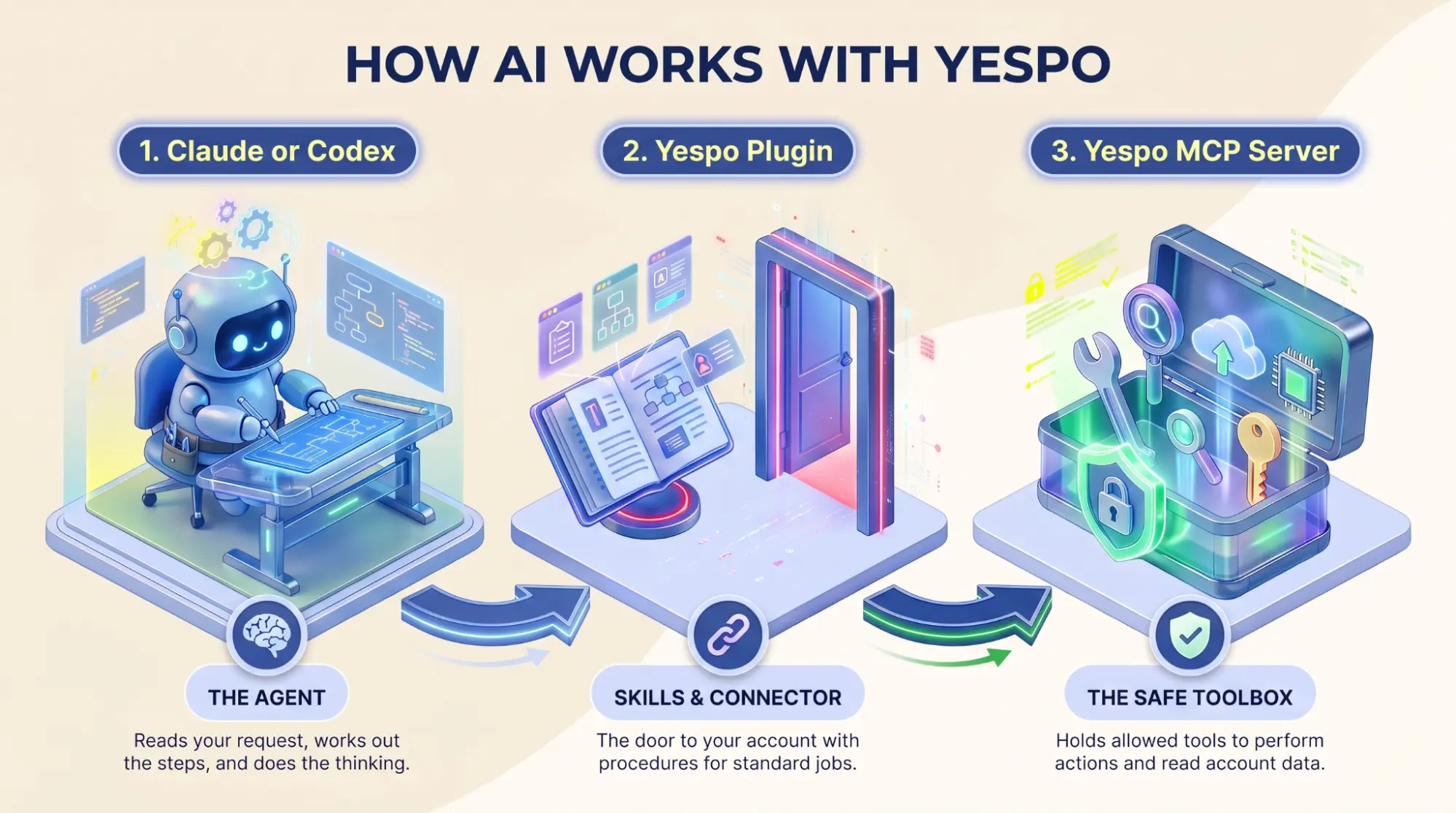
Underneath, there are three separate parts worth understanding.
Claude or Codex is the agent. It reads what you asked for, works out the steps, and does the thinking.
The Yespo plugin brings the skills and the connector. Skills are procedures written for the jobs that come up. The connector is the door between the agent and your account.
The Yespo MCP server holds the tools. These are the specific things the agent is allowed to do in your account, and the data it’s allowed to read.
What is MCP?
For simplicity, you can think of MCP as a standardized API for AI tools. It is the connection layer that lets an AI agent use approved platform tools to read account data and perform permitted actions.
If you want to dive deeper into the technical part of it, you can check the documentation.
So, how did we get here? Two things emerged roughly at the same time. Models got properly good at using tools instead of describing them, and MCP gave the industry a common way to plug an agent into a product. Before that, connecting an AI system to your CDP meant a separate development project, often with a sizeable budget.
Skills and MCP Tools: What’s the Difference?
The distinction is important. It tells you which jobs will go smoothly and which ones are still an experiment you should keep an eye on.
MCP tools are single actions. Read this template. Pull this report. Add these three contacts to that segment. Each one does exactly one thing, and none of them knows what the others are for.
Skills are the procedure written down. A skill wraps the instructions, the checks, and the expected output around a job people do constantly.
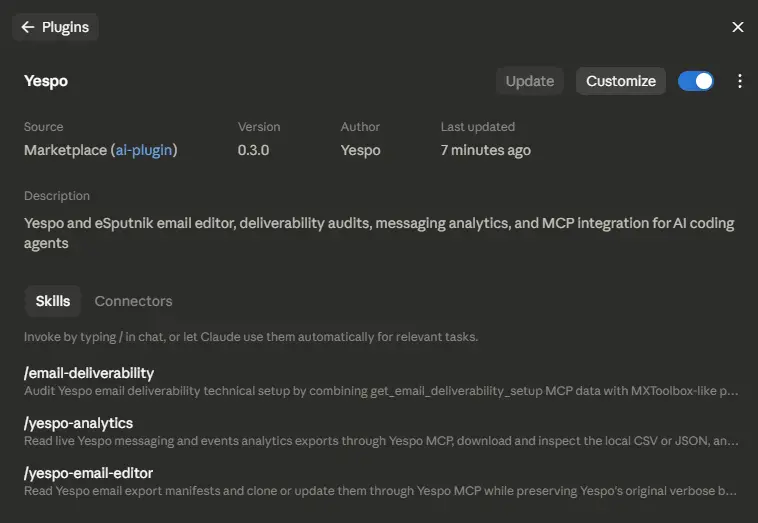
Yespo ships three of them today:
-
yespo-email-editor for reading, cloning, updating, and localizing template
-
email-deliverability for auditing your sending setup against public DNS and HTTPS checks
- yespo-analytics for working with exported messaging and event data
Oleksii Danchenko, Yespo COO
"The most underestimated effect is that expertise becomes executable. Skills aren't PDFs in Confluence that nobody opens; they're instructions in a git repository that can be versioned and run the same way for everyone. Once your strongest specialist has defined the correct deliverability audit process, the whole team gets that standard, including someone who joined yesterday. For agencies and multi-account teams, quality stops depending on which particular person happens to take the account."
Besides those three, the agent can still reach the wider set of Yespo MCP tools, depending on what your account has and what the connected user is allowed to touch. This includes:
- Messages across Email, Mobile Push, App Inbox, and SMS
- Contacts and static segments
- Events and contact activity
- Workflows and the messages inside them
- Analytics at account, workflow, and message level
These provide two distinct ways to work: name a skill when the job follows a known procedure and you want the checks applied, or just describe what you want when it's a one-off and you mainly need the agent to fetch things and think.
What You Can Actually Delegate
Three of these six areas run on packaged skills; the rest lean on MCP tools your account and your permissions make available.
Edit and Localize Email Templates
With yespo-email-editor, the agent reads and clones templates, updates the subject line, preheader, body copy, and button text, localizes a full template, keeps Unicode and language-specific CSS intact, and swaps an existing image through a Yespo image upload session. The builder’s HTML and CSS structure survives the process.
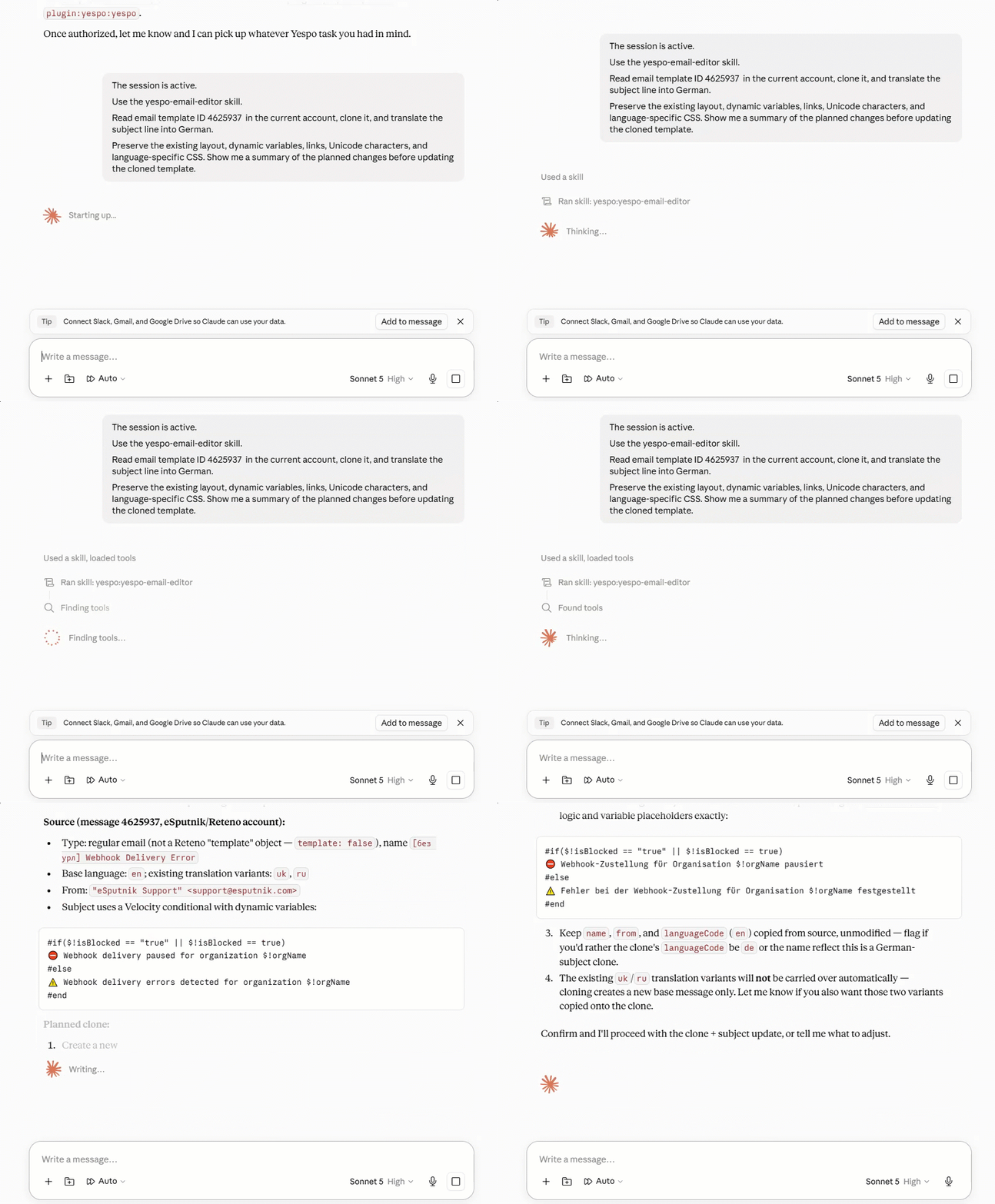
Where the agent stops: this changes content and existing assets, not the layout underneath. Text baked into an image stays out of reach — swap in a new one once someone's made it, and the agent handles the rest.
Audit Email Deliverability
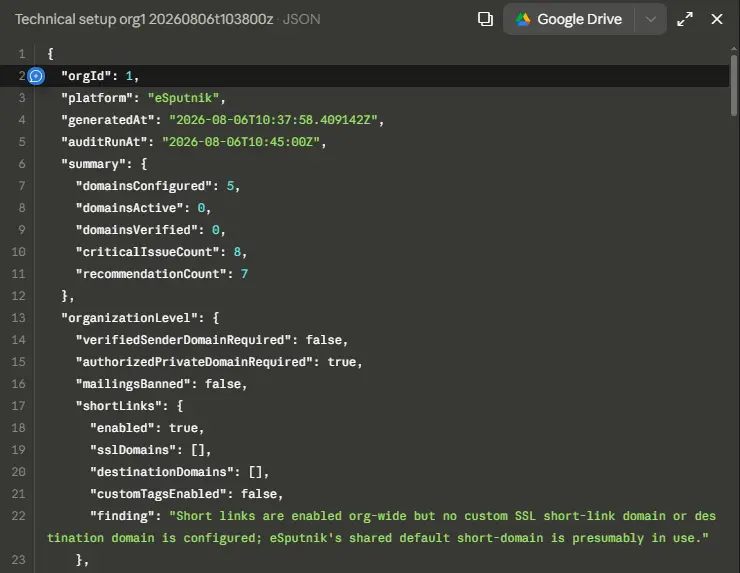
With email-deliverability, the agent takes your Yespo deliverability setup and checks it against public SPF, DKIM, DMARC, MX, and DNS resolution records, plus short-link domain and SSL signals. You get a readable Markdown report plus a structured JSON one, sorted into issues, risks, and recommended actions.
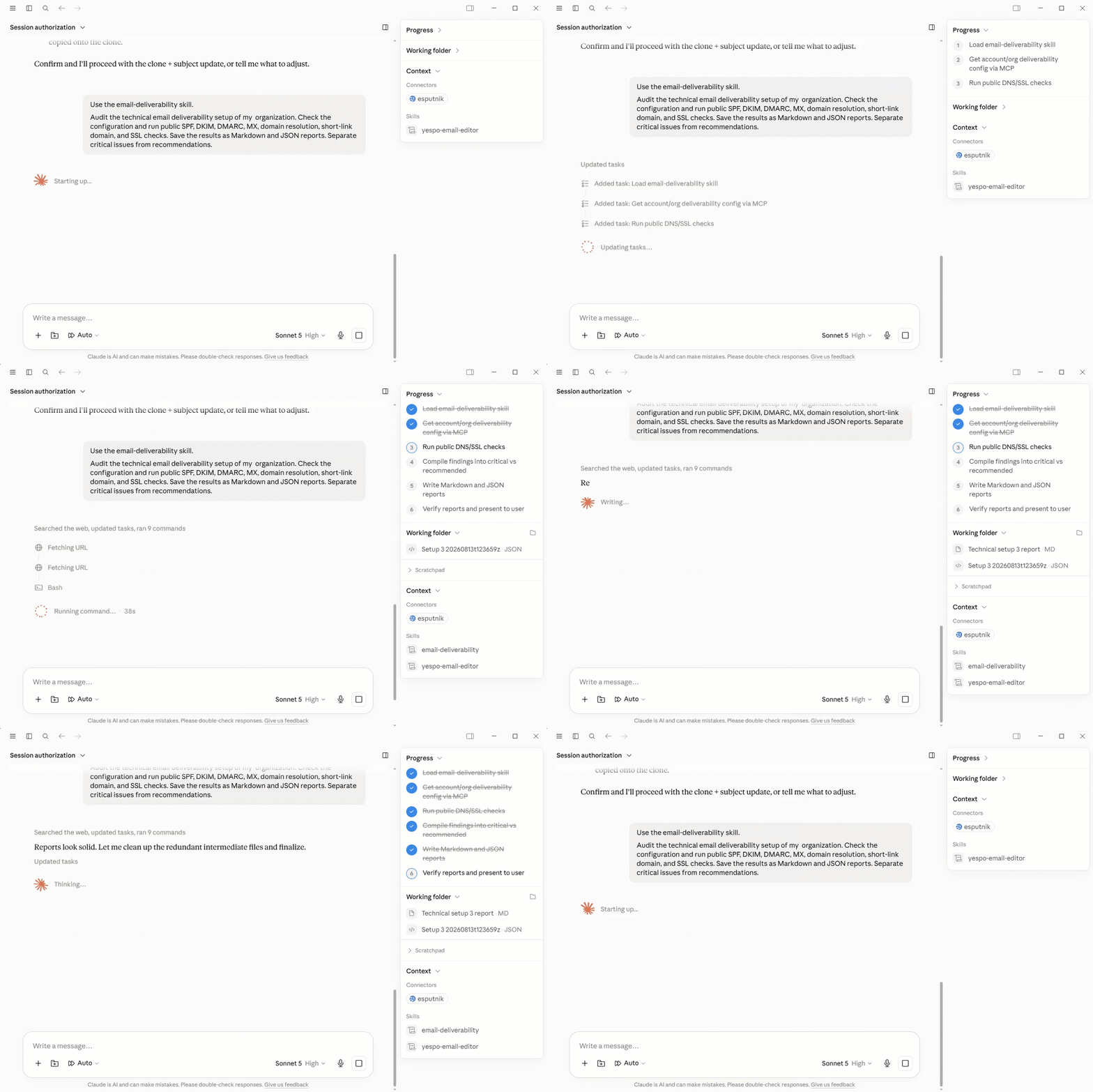
Where the agent stops: it finds the problems, not the fix. DNS records, certificates, and provider settings live outside Yespo — that part's on whoever runs your infrastructure.
Analyze Messaging and Event Performance
With yespo-analytics, the agent retrieves signed CSV or JSON exports, processes the rows locally, and then ranks campaigns, workflows, or messages, compares bulk against triggered communications, calculates your key rates, analyzes event volumes, compares periods, looks for unusual metric combinations, and lays it all out in summary tables.
Where the agent stops: it works with what's already in the exports. Today's numbers aren't in there yet — the data refreshes once a day.
Bulk Template Operations and QA
Using the email editor skill together with available MCP tools, the agent can clone and rename several templates in one pass, replace links across every email in a workflow, pull the subject, preheader, body, CTA, and footer into one place for review, check unsubscribe links, look for inconsistencies across a sequence, and diagnose why a template renders badly on iOS and fix the HTML and CSS behind it.
These are controlled operations. The agent reads the current state, summarizes what it intends to change, applies it to a clone where that makes sense, and reports back on what moved.
Work with Contacts and Static Segments
Depending on your tools and access rights, the agent can create a static segment and add specified contacts to it, show you the recent messages sent to a contact, summarize someone’s communication history, and work out why a contact isn’t in a segment they should be in.
Where the agent stops: conditional segments aren't there yet in this version — static segments only, for now.
Explain and Review Workflows
The agent can describe what a workflow does and walk through its structure in plain language, review the messages inside it, check whether contacts are placed in two workflows at once, and help you set up an A/B experiment.
Where the agent stops: reviewing and explaining, not launching. Creating, running, or scheduling bulk campaigns is still yours to do.
How It Works in Yespo
The chain is short:
Claude or Codex → Yespo plugin → Yespo MCP server → Yespo account
Claude or Codex interprets your request and coordinates the task. The plugin adds the reusable skills and the right connector configuration. The MCP server provides tools to read account data and perform the actions you confirm and are allowed to perform.
Want to see the agent handle your own templates and reports?
A few things you need to know:
- No integration project. This doesn’t require custom API work, webhooks, or a developer. You install the plugin and authorize the Yespo connector. You don’t paste a Yespo REST API key into the plugin settings.
- One repository, three environments. The same plugin serves Claude Cowork, which gives you a visual desktop environment, Claude Code, which is aimed at command-line and development work, and Codex, which runs in the desktop ChatGPT app.
- The plugin packages the recurring jobs, while the MCP server provides the broader account tools. This distinction matters — that's why some tasks require additional checks.
- The agent works inside the connected user’s access rights. Depending on how the agent is configured, it may ask you to confirm before it reads or changes data.
- It’s an initial release. The toolset, the skills, and the setup can all change.
Setup instructions are available in the documentation, both for Claude and Codex.
Use Cases
Working Out Why Something Broke
The situation. A customer says they never got the order confirmation. A campaign's open rate looks fine, but clicks have dropped sharply. Someone in support asks why a customer is getting the wrong sequence. Each of these is twenty minutes of clicking through screens to build a picture that you then have to remember.
What the agent does. It pulls the contact’s recent messages and activity, reads the relevant workflow structure, and checks segment membership, then tells you what it found and what it thinks is happening. For deliverability, email-deliverability combines your Yespo configuration with public DNS and HTTPS checks and separates the critical problems from the nice-to-haves. You still decide whether the diagnosis is right, and anything touching DNS goes to whoever runs your infrastructure.
Sample prompt:
| Contact ID 58821 should be in segment ID 1234 but isn't. Find out why and suggest a fix. Which messages did contact ID 58821 receive in the last 30 days, and why? Use the email-deliverability skill. Audit the technical email deliverability setup of my Yespo organization. Combine the Yespo configuration with public SPF, DKIM, DMARC, MX, domain resolution, short-link domain, and SSL checks. Separate critical issues from recommendations and save Markdown and JSON reports. |
Localizing Templates for a New Market
The situation. Six templates, three languages, and a launch date. The translation itself is the easy part. What takes the entire day is making sure the dynamic variables are working, the links still point somewhere real, the diacritics didn’t turn into question marks, and the German copy hasn’t broken a button because German words are longer.
What the agent does. yespo-email-editor reads the template, clones it, translates the copy, and preserves the layout, variables, links, Unicode, and any language-specific CSS. Clear email prompts help marketers describe the required changes more precisely and get more predictable results from AI-powered editing. Ask it to show you the planned changes before it writes anything, and it will. If a template has text inside an image, the agent can swap the image once you’ve supplied the translated version, but it won’t generate that asset for you.
Sample prompt:
| Use the yespo-email-editor skill. Read email template ID 3935987, clone it, and translate the copy into German. Preserve the existing layout, dynamic variables, links, Unicode characters, and language-specific CSS. Show me a summary of the planned changes before updating the cloned template. Clone template ID 3935987 and update the subject line for the spring sale campaign. |
Having the Numbers Before the Meeting
The situation. You have a meeting this afternoon. Someone will ask how last month went and whether triggered workflows are performing compared to bulk campaigns. Answering properly means pulling several exports, building a spreadsheet, and crunching numbers fast.
What the agent does. yespo-analytics pulls the exports, processes them locally, and gives you a ranked table with the rates already calculated. It'll also compare periods, compare bulk against triggered, and flag metric combinations that look odd — sometimes surfacing genuinely curious insights. Check the filters and the date range before you quote anything.
Sample prompt:
| Use the yespo-analytics skill. Analyze all email campaigns from the previous calendar month. Rank them by Click Rate and include Sent, Delivered, Open Rate, Click Rate, CTOR, Conversion Rate, Bounce Rate, and Unsubscribe Rate. Exclude campaigns with fewer than 10,000 delivered messages. Compare the performance of bulk campaigns and triggered workflows for Q1. My Open Rate is high but my CTR is low. What could explain that? |
Understanding a Workflow You Didn’t Build
The situation. You’ve inherited an account, or a workflow has been running since before you joined and nobody is quite sure what it does anymore. Reading it block by block in the builder tells you the mechanics but not the intent.
What the agent does. It reads the workflow structure and describes what it does, step by step, in plain language. It can review the messages inside it and suggest improvements, and it can check whether contacts are participating in two workflows at once, which is usually how people discover they’ve been sending the same customer two messages at the same time.
Sample prompt:
| What is workflow ID 434661 for? Describe its structure and steps. Review all the emails in workflow ID 434661 and suggest improvements. Are there any contacts currently participating in two workflows at once? |
Bulk Edits and the Pre-Launch Check
The situation. The Spring Sale campaign is going out on Monday. Someone needs to confirm every email has a working unsubscribe link, the subjects and preheaders match, the hero images are correct, and everything renders properly on an iPhone.
What the agent does. Working from the email editor skill plus available MCP tools, it can flag missing or broken unsubscribe links across a whole workflow; check subjects, preheaders, and images across a series and point out anything unfinished or inconsistent; replace links in bulk; and pull all the copy into one place so you can actually read it. It reports what it plans to change before it changes anything, and applying edits to a clone first is a sensible habit for anything you can't easily undo.
Sample prompt:
| Check every email in workflow ID 434661 for an unsubscribe link. Flag any that are missing or broken. Check the subject line, preheader, and hero image across the Spring Sale series templates. Flag anything that looks unfinished or inconsistent. Clone templates ID 3935987, 3935988, and 3935989. Add the suffix "Copy Q2" to each template name. |
Oleksii Danchenko, Yespo COO
"An assistant inside the platform is by definition confined to the platform's boundaries, and a marketer's work isn't. The brand book lives in files, exports live in spreadsheets, data sits in BigQuery, the client's website is outside the platform. The most useful use cases happen at these intersections."
How Access, Confirmations, and Review Work
You sign in to your Yespo account and authorize the connector. The agent sees only the organizations and data available to the user who authorized it. The plugin doesn’t get around Yespo’s access controls, so if you can’t do something in the interface, neither can the agent working on your behalf.
Want to see how much of your week this could take off your hands?
Claude or Codex may ask you to confirm before using a tool. For read-only tools you use constantly, you can allow them permanently and stop being asked. For anything that creates or changes messages, contacts, or workflows, leave confirmation switched on unless your organization has agreed otherwise.
Beyond that, a few safeguards you should implement in all your work with the agent:
- Clone important templates before any significant edit.
- Verify translations, links, dynamic variables, and images yourself before sending.
- Check the metrics and filters behind any number you’re about to put in a report.
- Run deliverability recommendations past whoever actually owns your infrastructure.
- Keep passwords, API keys, payment details, and third-party personal data out of prompts.
How Do You Proceed?
The plugin doesn’t replace anyone. It takes the part of your week that consists of opening screens, exporting things, comparing them, and making the same edit multiple times, and it compresses that into a request and a review.
Goals, approvals, and judgment are still up to you. What changes is how much of your day is spent in transit between them. If you’ve read this far and recognized jobs you’d be glad to hand over tomorrow, it’s time to take action.
Oleksii Danchenko, Yespo COO
"One thing won't change even a year from now: a human oversees everything. Autonomy increases where the outcome is measurable and changes can be rolled back. Everywhere else, it isn't about speed — it's about risk."
The plugin is open now. Request access with the form below, or read the documentation first if you want the full picture: skills, tools, and where things currently stand.