Content
17 April 2026
940
19 min
0.00
How to Build an Omnichannel Strategy in 4 Steps

Mariia Natarova

Yaroslava Kurta
Content
As our research shows, today's ecommerce customer takes a non-linear path to purchase. But understanding that customers buy in unpredictable ways is only half the picture. The real challenge for any business is not simply to be present across all channels – it's to connect them into a single system. So that instead of scattered data in your CRM, email service, and website, you can see a complete buyer profile and reach that person at exactly the right moment.
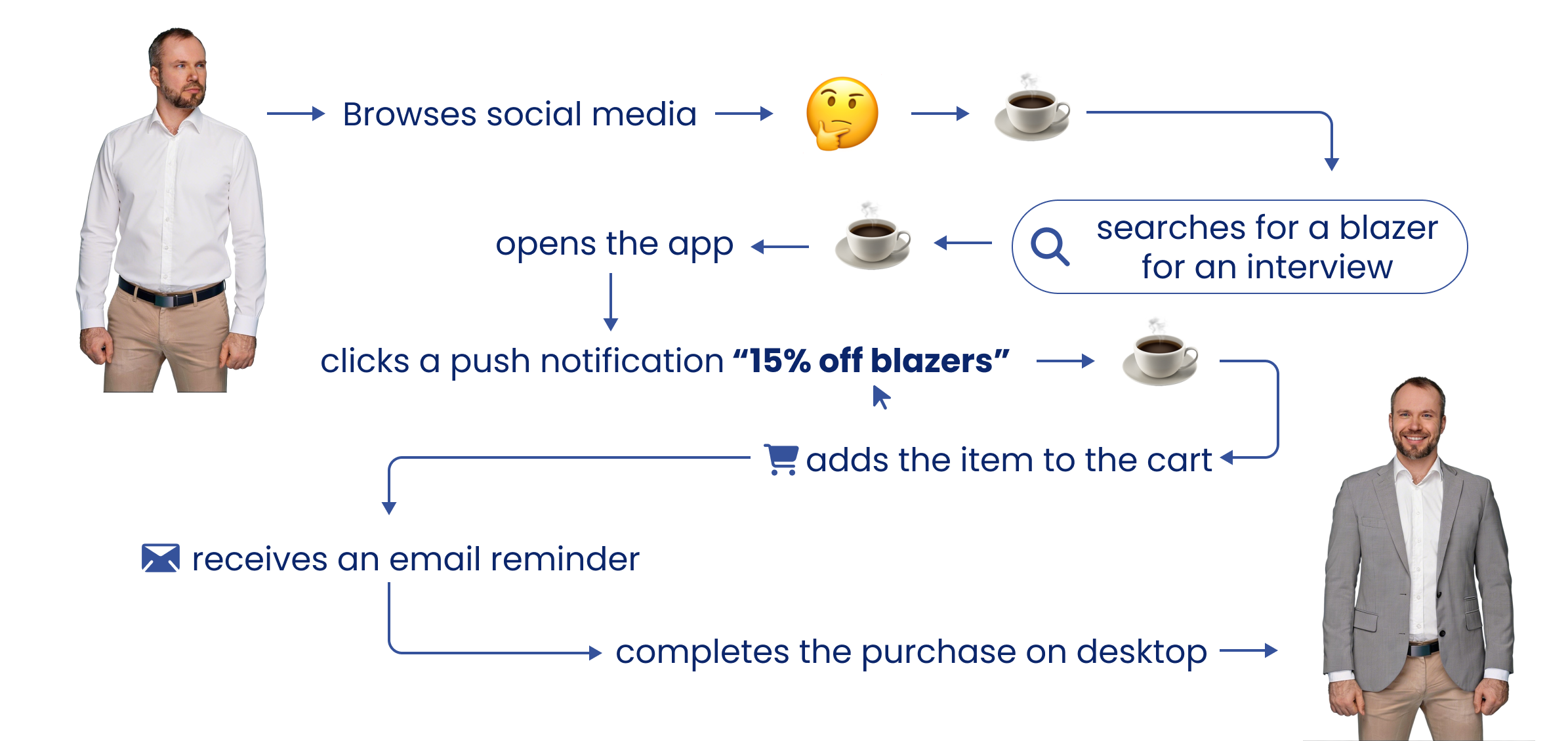
That's the essence of omnichannel: not adding yet another channel, but connecting every touchpoint into one coherent story. You don't need years to build a system like this – a few clear steps are enough to get started. Below, we walk through how to put an omnichannel strategy into practice: from mapping the real customer journey to personalization tools and hypothesis testing.
Step 1. Understand the Real Customer Journey
This stage is about using accurate data, not assumptions. For omnichannel to work seamlessly, you need a clear picture of exactly who your customer is and how they move toward a purchase.
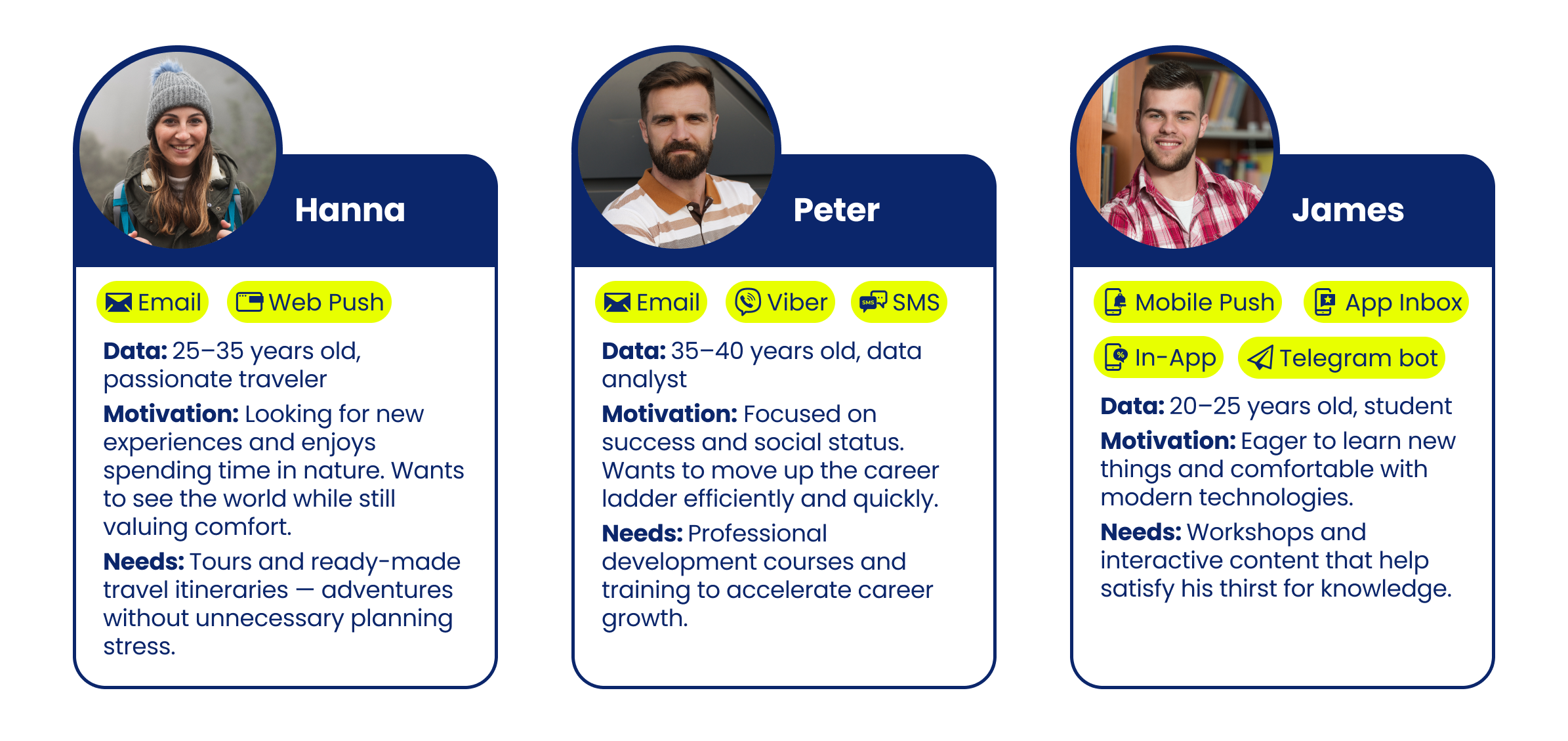
1. Build a Customer Profile
Start by building a buyer persona – one that goes beyond age and gender to capture digital habits. Does your customer tend to start searching on mobile and complete the purchase on desktop? Do they engage with push notifications, or turn them off immediately?
For example, if your niche is consumer electronics, keep in mind that customers will compare models by specs and price – meaning the path to purchase will be long and considered. That customer needs multiple touchpoints across several channels, spaced out over time.
Key things to understand:
- which channels or devices the buyer prefers;
- at what stage interest first appears;
- what drives the decision and what holds it back;
- when to communicate and when to hold back.
This level of detail will later form the foundation for segmentation. For instance, you might identify a group of users who interact with the brand exclusively through mobile channels. Their strategy would be built around push notifications and In-App messages, while desktop users would respond better to email.
Tip
Many people are happy to share their interests when they understand why they're being asked and what they'll get out of it. To collect first-party data and enrich your customer profiles, set up a survey pop-up on your site that's tied to the context of user actions.
2. Build a Customer Journey Map
Once your personas are ready, overlay a Customer Journey Map onto their behavior and analyze the existing scenarios. If you don't yet have a detailed map, work from the classic stages of the customer journey:
- Awareness – the buyer sees an ad on social media or finds you through search.
- Consideration – they visit the site, browse the blog or scroll through products, read reviews, and sign up for a newsletter.
- Purchase – they add an item to the cart and place an order.
- Retention – they receive a review request, a discount code for their next purchase, and so on.
Once you've mapped out every step, you'll quickly see where customers most often abandon their cart, when they stop opening newsletters, whether they respond to reminders, and which channel drives the most engagement.
Paired with analytics, even a basic customer journey map will show you which touchpoints are working and which are losing people's attention. It will also reveal exactly when to bring in an additional channel to motivate a purchase or win a customer back.
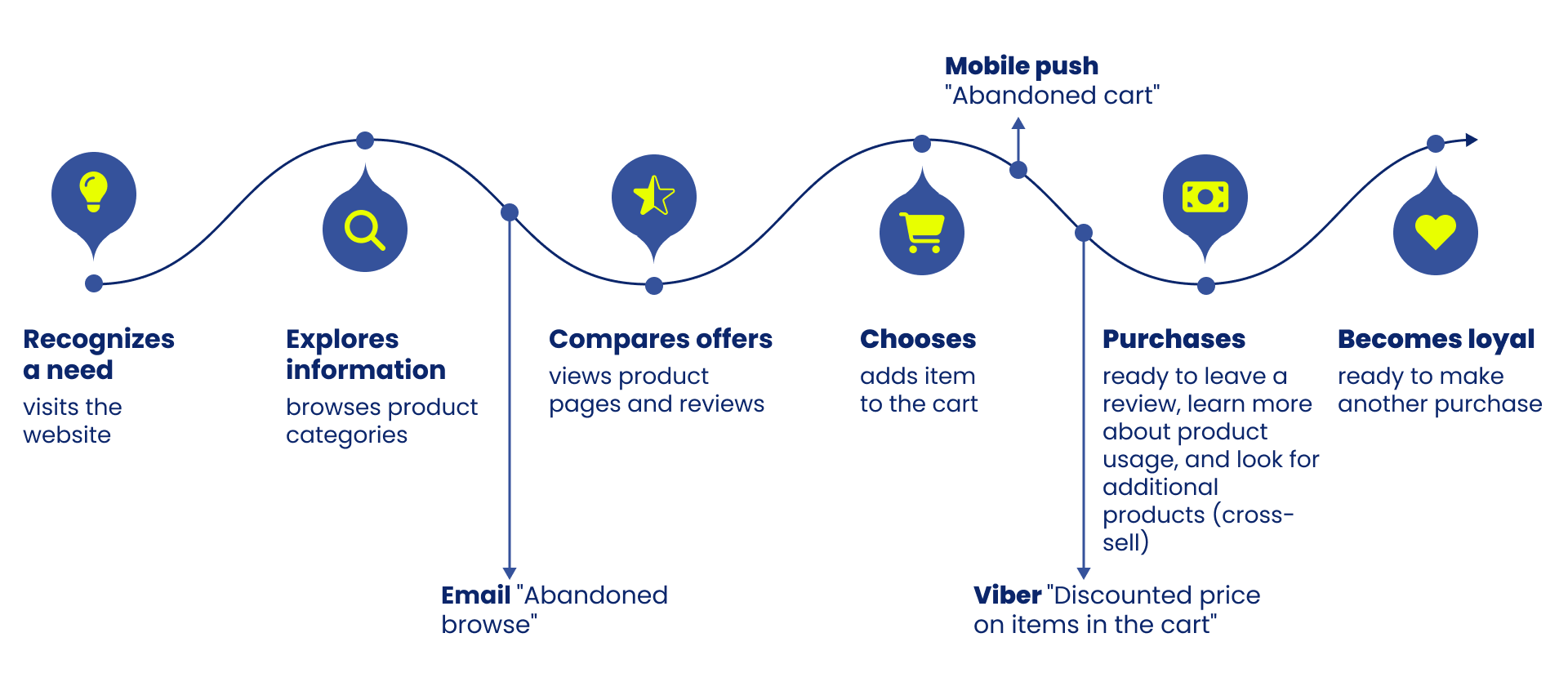
Once the customer route is outlined, it's time to choose which communication channel will be most appropriate at each stage. In the omnichannel guide, we included a channel comparison table to help you understand which tools work best for acquisition, retention, or reactivation.
3. Enable Web Tracking to Collect Data
Buyer personas and journey maps are theory – theory that needs to be tested in practice. Web tracking helps with that: it's a tool for collecting data on how a user interacts with your site or app:
- which pages they view;
- which categories interest them;
- which device they're using;
- where they're located.
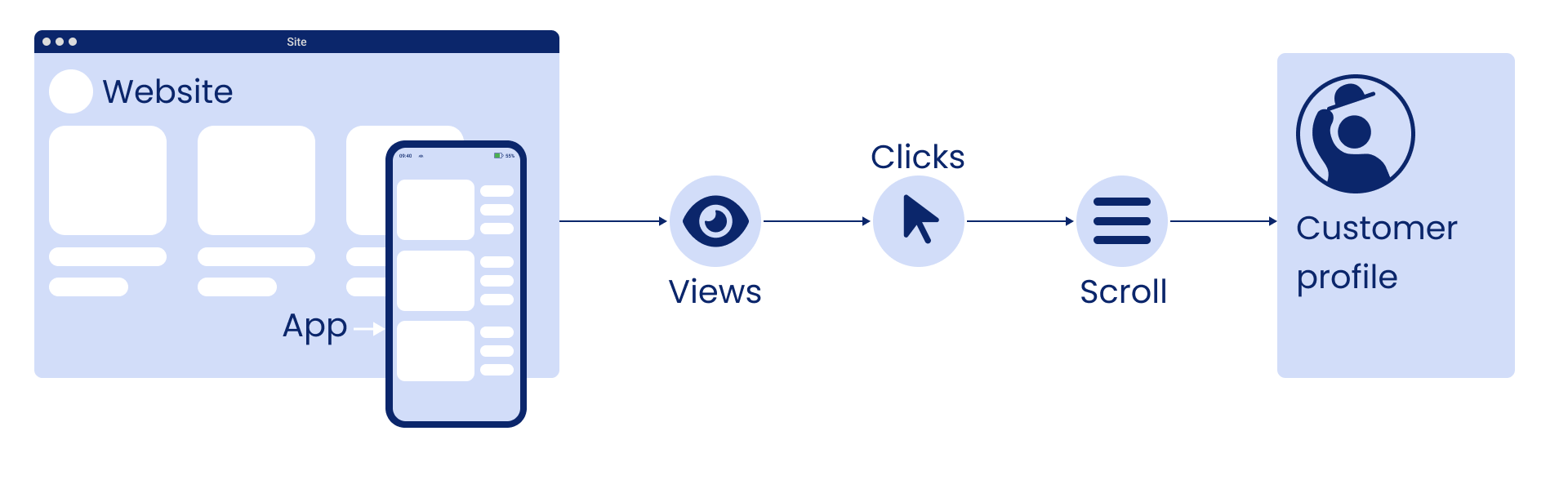
At this stage, the main goal is not immediate reaction – it's building a complete customer profile.
Web tracking data reveals context that is nearly impossible to collect manually. For example, if someone regularly browses products in the app but never buys and ignores push notifications, they may simply find it inconvenient to place an order from their phone.
This information becomes the foundation for the unified customer profile we'll build in the next step.
Step 2. Consolidate Data into a Single System
The more channels and touchpoints you have, the easier it is to lose coherence. Data gets scattered across your CRM, website, email service, POS, app, and survey forms. Without a central hub, marketing operates in the dark: each channel seems to "see" the customer, but has no idea what has already happened with them.
The same scattering happens one level up, inside the team that runs these campaigns: briefs live in one tool, message drafts in another, and customer replies sit in personal inboxes. Teams that keep external communication aligned bring those pieces into one shared workspace, so the campaign brief, the final messages, and what customers actually said stay connected from planning through follow-up.
To avoid this, you need a unified system that brings all sources together into a single profile. Everything a person does when interacting with a brand – purchases, product views, email opens, survey responses – is stored and updated in real time. This gives you a complete picture of every customer.
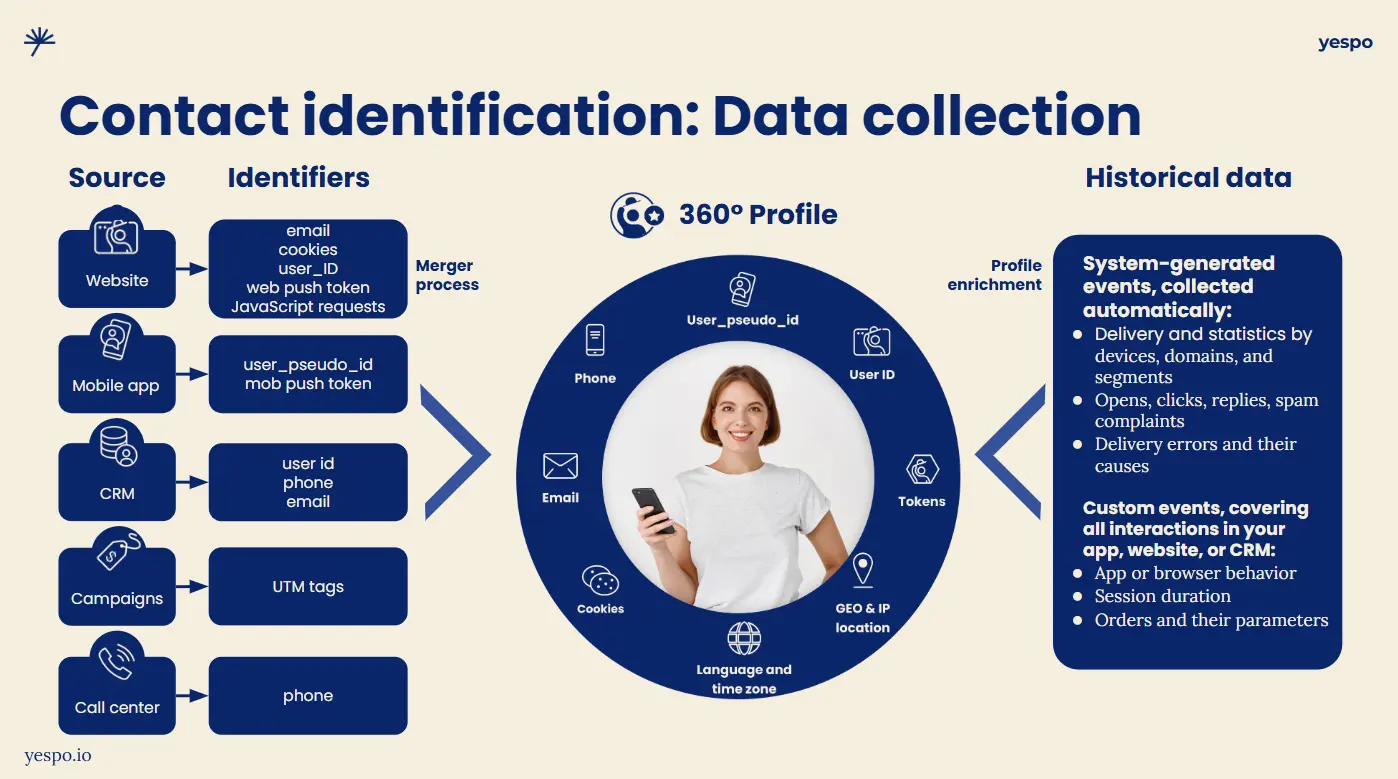
This is exactly the role a Customer Data Platform (CDP) plays. It doesn't just accumulate data – it lets you work with it flexibly: build segments, launch personalized scenarios, and adapt communication to context.
This is the shift from disconnected actions to a unified logic – from ad-hoc campaigns to systematic engagement that adapts to each customer automatically.
The first step at this stage is to connect your core sources: CRM, website, mobile app, and so on. If your data is fragmented, start with the channel that has the most user interactions.
In Yespo CDP, this is handled through ready-made integrations or API-based data exchange. After the first sync, the platform begins building customer profiles that can immediately be used for segmentation, scenario triggers, and personalization.
Step 3. Implement Omnichannel Engagement Tools
Once data has been collected and organized, it's time for practical application. This is where an omnichannel strategy moves from concept to execution. To turn personal data into a relevant, user-centric brand experience, you need the right tools in place.
Here are the pillars that hold up personalization in omnichannel:
1. Segmentation
To turn a general contact database into an active audience, a single criterion for building a group isn't enough. There are several levels of segmentation:
- Basic – by geography, demographics, subscription source, device type, and so on.
- Behavioral – based on customer actions on the website, in messages, or in the mobile app.
- Event-based – for example, "all users who browsed the 'skincare' category in the last 14 days."
- RFM segmentation – for assessing customer loyalty based on recency, frequency, and monetary value.
- Predictive segmentation – uses machine learning to forecast the likelihood of a purchase or churn. This enables you to act proactively rather than after the fact.
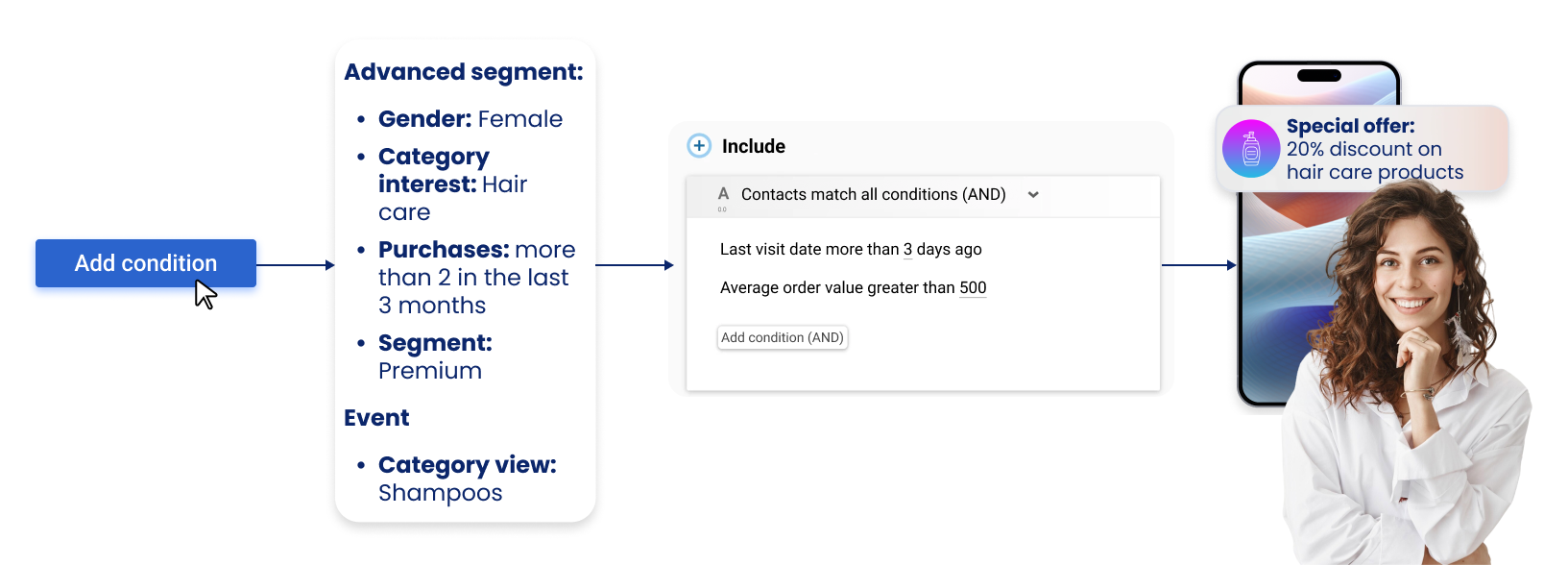
This flexibility lets you create precise micro-segments and run campaigns with high relevance.
Tip
Combine RFM and behavioral segmentation to better target your loyal audience. For example, identify customers with high purchase frequency and spend who haven't opened any messages in the last 30 days. That's a signal that a loyal customer is going cold. Launch a separate reactivation series – this lets you focus your efforts on high-priority contacts and win back those with the greatest potential.
2. Product Recommendations
For recommendations to work, you need a mechanism that can combine customer history, product attributes, and the context of each individual buyer's actions into a unified logic.
A transformer model does this best – a type of neural network that can recognize sequences, relationships, and intent. It doesn't pick products at random; it predicts which offers are most likely to interest a specific user.
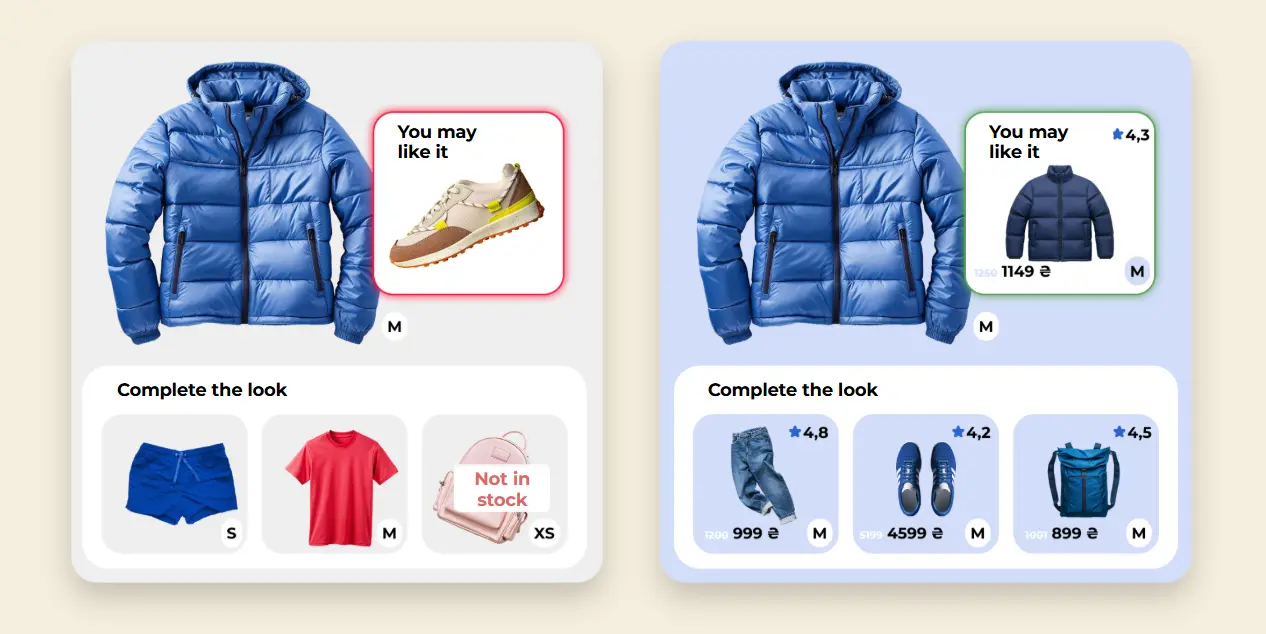
And thanks to integration with a large language model (LLM), recommendations stay accurate even without a full interaction history: the system understands the meaning of a product description and builds selections based on content, not tags.
Puma has already tested the improved product selections and achieved the following results:
- CTR increased by 76%
- conversion grew 7x
- Order Share (the proportion of orders that included items from the recommendations block) grew 10x.
Get started with AI product recommendations
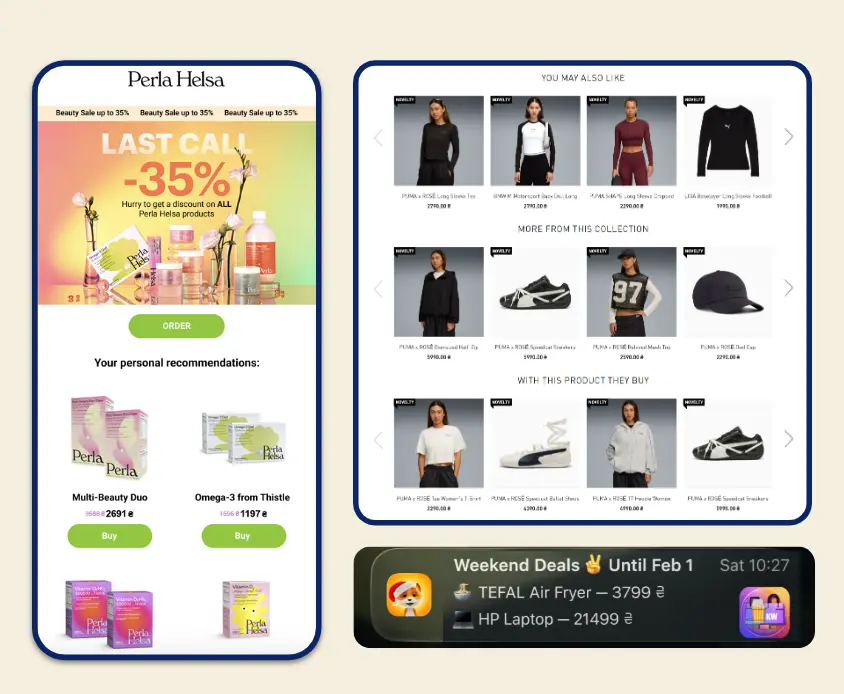
It's important that recommendations follow the customer everywhere:
- on the website – in product cards, category pages, the cart, and even on 404 pages;
- in the mobile app – via In-App, App Inbox, and mobile push;
- in other direct channels – email, Viber, web push, SMS, Telegram bot.
To make recommendations work harder for your business goals, they can be customized: prioritizing certain products, excluding specific items, accounting for seasonality, and even applying custom logic for a particular campaign. A good example is MasterZoo. The brand configured the algorithms to automate the clearance of remaining stock, promote volunteer initiatives, and sell products directly from blog pages.
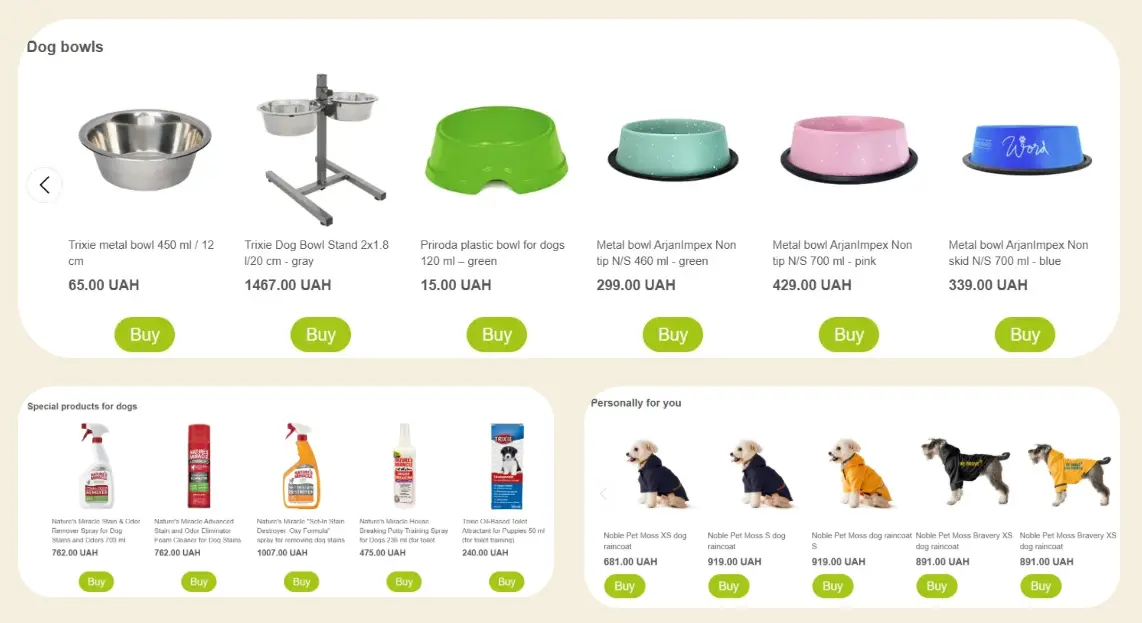
Yespo analysts can adapt models to your business objectives, taking into account the specifics of your product range – whether that's increasing average order value, reducing cart abandonment, or promoting a category.
3. Triggered Scenarios
If segments answer the question of "who," triggers answer "when" and "why right now." They launch communication at the right moment: when a user views a product, abandons a cart, hasn't visited in a while, or has just made a purchase.
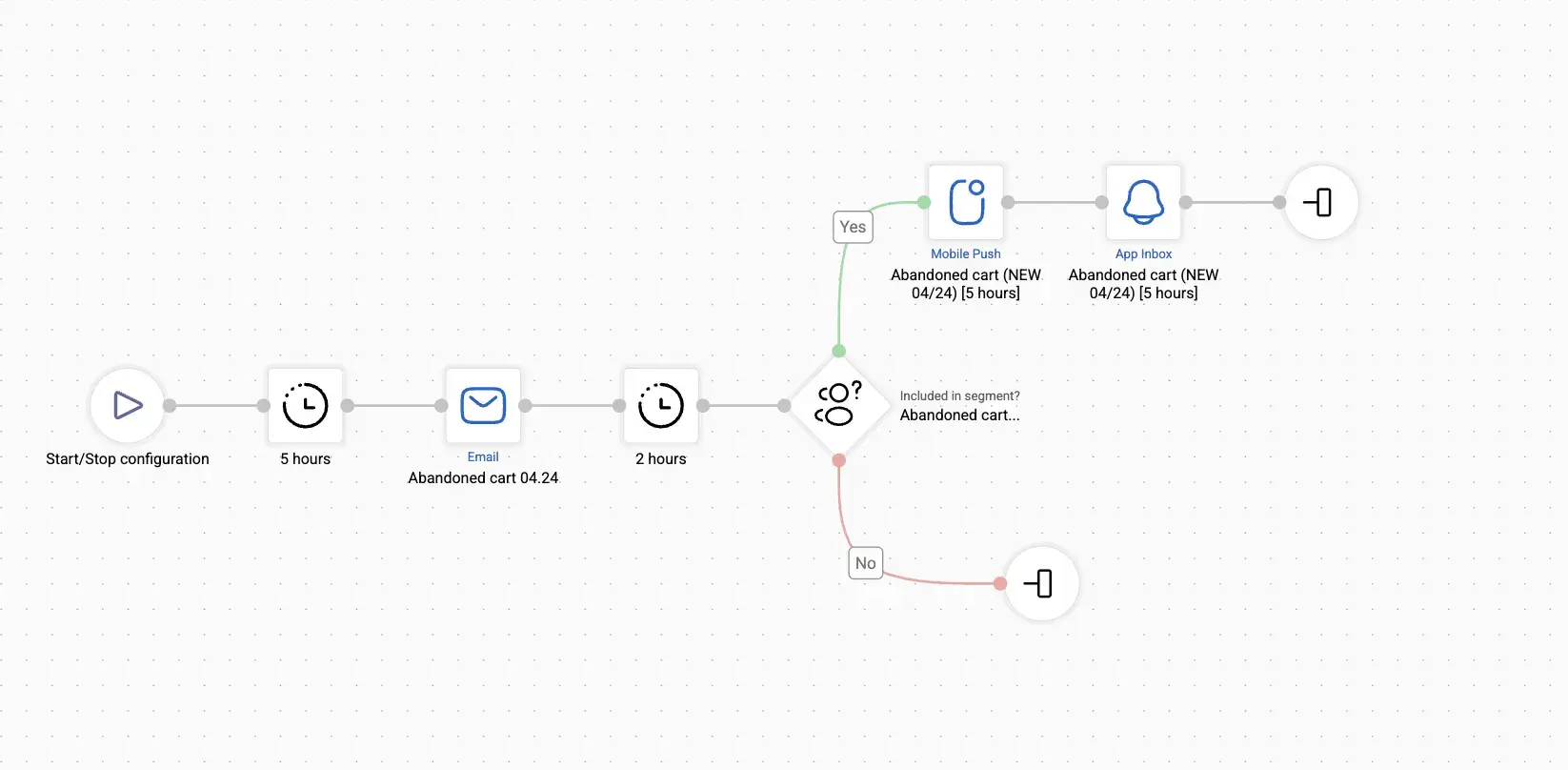
Depending on your business, different triggers may be most effective – from "Abandoned Browse" to "Next Best Offer" after a purchase. To avoid starting from scratch, take a look at our article "10 Most Effective Triggered Scenarios for Ecommerce," which includes case studies and recommendations to help you choose the sequences that will deliver results in your specific niche.
Modern CDP platforms, including Yespo CDP, can take the technical workload off your marketing team. For example, Yespo handles the full technical cycle:
- creating email templates in your brand style;
- enriching them with dynamic elements – from the recipient's name to product recommendations;
- setting up web tracking and segments for each scenario;
- building the scenario logic;
- testing scenarios to ensure they work correctly.
The result is not just automation – it's a ready-made system that responds to customer behavior on its own: reminding, re-engaging, and inspiring action. All you need to do is monitor the results and scale your communications.
4. AI Assistant for Email Campaigns – Coming Soon to Yespo
When you have a lot of emails to send and not much time, an AI assistant helps you make a start without any friction. All you need to do is set the campaign goal, tone of voice, and a few basic parameters. The system will generate a draft: complete with subject line, content, and structure. This lets you move from idea to finished emails quickly, without the blank-page paralysis or time lost on manual block assembly.
The algorithm automatically arranges content into sections, suggests copy in the required style, generates subject lines, and adapts the layout to the correct format. If needed, everything can be customized to fit your brand. These emails work well in series – when you need to produce many messages while maintaining consistent style and logic. They're well-suited to digests, new arrivals, announcements, and re-engagement campaigns. They look polished, have a clear structure, and are easy to adapt for different segments and channels.
Even if some text needs manual editing, the assistant saves time on preparation and structure, leaving more room for creative decisions. It's a tool that amplifies the marketer: removing unnecessary steps, speeding up the start, and helping you focus on the message rather than technical details.
We're actively refining the AI assistant and preparing it for release in our email editor to make creating campaigns even easier and faster.
Step 4. Test, Adjust, and Improve
An omnichannel strategy can't be static. Audience behavior changes, new touchpoints emerge, and new interaction formats appear. What worked yesterday may lose its effectiveness today.
To stay relevant, you need to regularly test hypotheses, adjust scenarios, and analyze responses. In Yespo CDP, you can do this directly within your working environment – no complex reports or manual analytics required.
A/B Testing Across Channels
Tests allow you to make informed decisions rather than intuitive ones. When you have several options – what to say, how to present it, when to send – the system helps you understand what actually works for your audience.
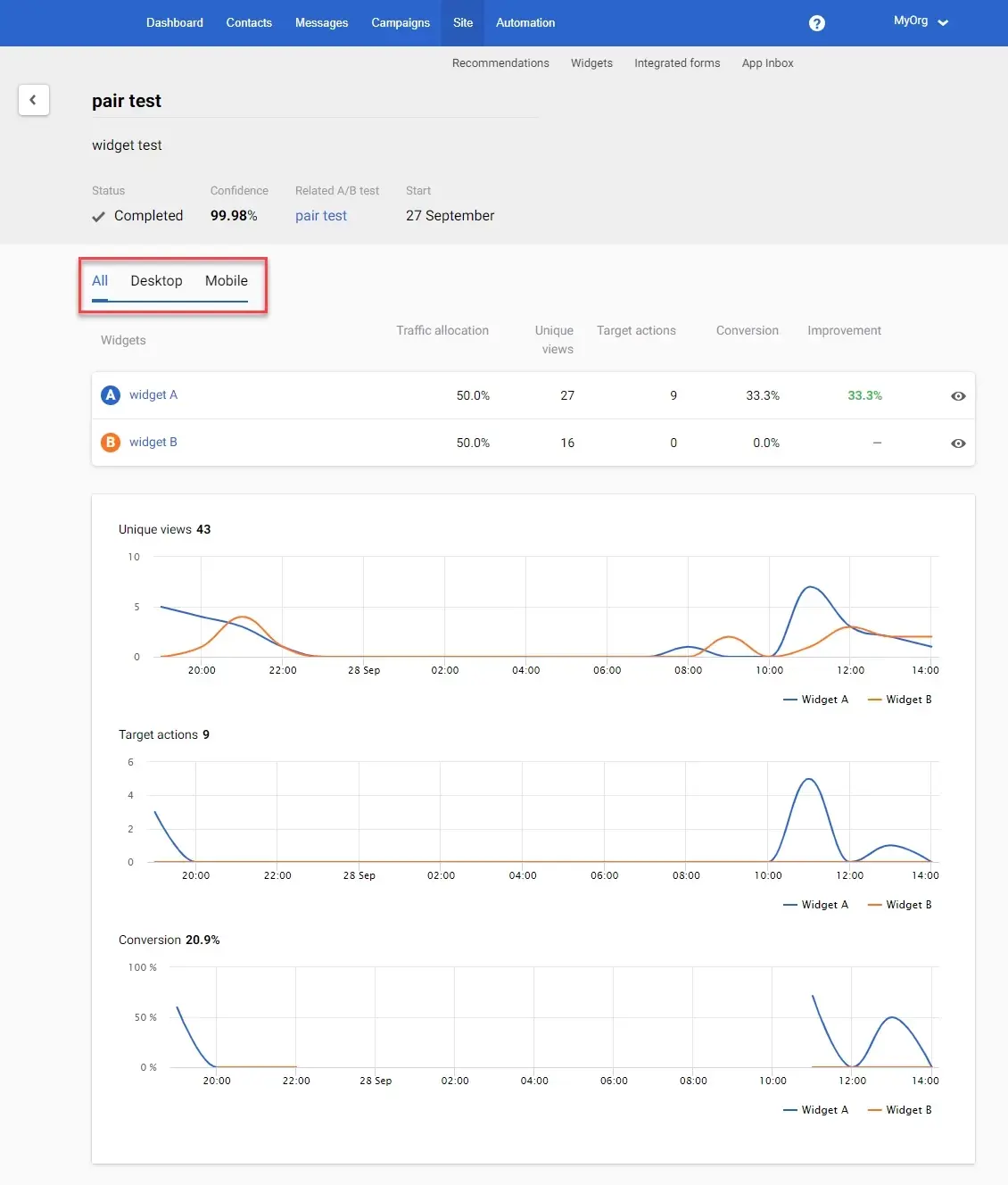
In Yespo, testing covers every level of engagement: subject lines, design, channels, triggers, message sequences, product selections, and website elements.
In scenarios, A/B tests are configured using a "Split" block. For example, you might want to check which version of an abandoned cart message performs better – one with a simple discount, or one with a countdown timer to create urgency. Audience distribution is automatic, and results are visible directly in the reports.
At the email level, A/B testing can be applied to subject lines. The platform supports several methods – from automatic testing within a single campaign to creating multiple conditional groups with different subjects. This lets you not only compare open rates, but also track the impact of the subject line on clicks and conversion.
You can also test website elements, such as pop-ups and product recommendation blocks. For recommendation blocks, you can test the data source, block name, placement, and appearance. For pop-ups – format, trigger logic, and adaptation for different devices. All results are automatically visualized: the system itself marks which variant is winning in terms of CTR or conversions, and which needs refinement.
Mobile push deserves a special mention. Getting a notification to land isn't just about writing it well – it's about finding what resonates best with your specific audience. The "One of Many" block handles this automatically: the system creates multiple versions of mobile push notifications and tests them across your contact base.
The best-performing ones are reused, and new ones are generated based on them. This significantly speeds up the workflow, increases click-through rates, and makes each notification feel as though it was written specifically for that person.
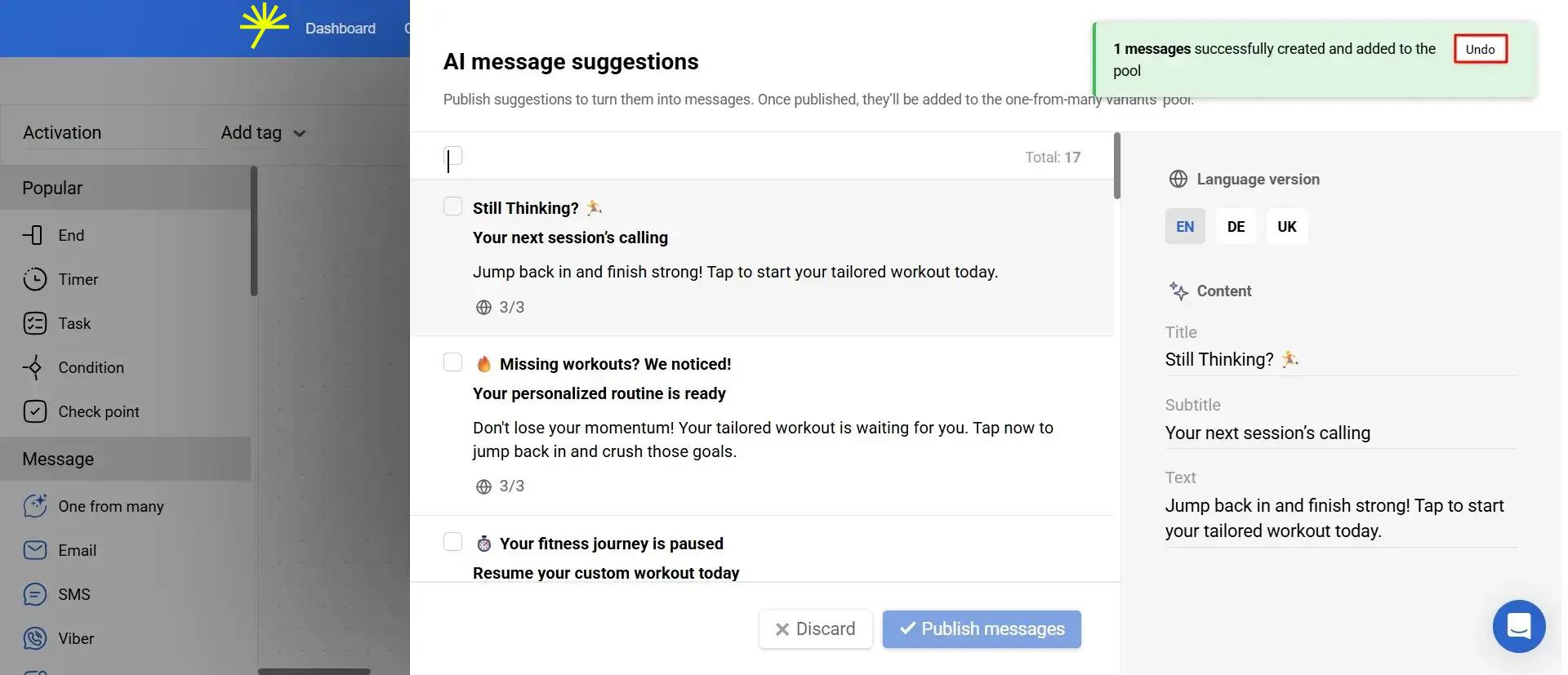
Messages are created using a built-in AI engine that takes existing notifications and generates new variations – in the right tone, with context and format in mind. If a scenario is already active, the system draws on stats: which subject lines had the highest open rates, which copy drove clicks. If not, it uses templates from the current set. All of this works as a single editor that suggests alternatives, translates them into all required languages, and lets you launch them immediately.
For marketers, this means less manual work and more confidence in the outcome. You can see all generated versions at once, keep only the ones you need, make edits, and apply them to the campaign – all without copy-pasting, unnecessary iterations, or the risk of wasting time on a variant that won't convert.
This approach makes push not just present, but relevant – at the right moment, for the right people, with the right words.
This functionality helped the ANTs pharmacy chain increase conversions from abandoned carts:
- mobile push CTR doubled (x2);
- average order value increased by 23%.
Want to increase the effectiveness of my automated campaigns?
Get a quick consultation
Analyzing Results and Identifying Weak Points
Once a scenario is live, it's important not just to look at overall numbers – it's about understanding exactly where the customer loses interest. In Yespo, all analytics are available directly within scenarios and messages: opens, clicks, conversions, product engagement – everything is displayed in context, without switching between reports.
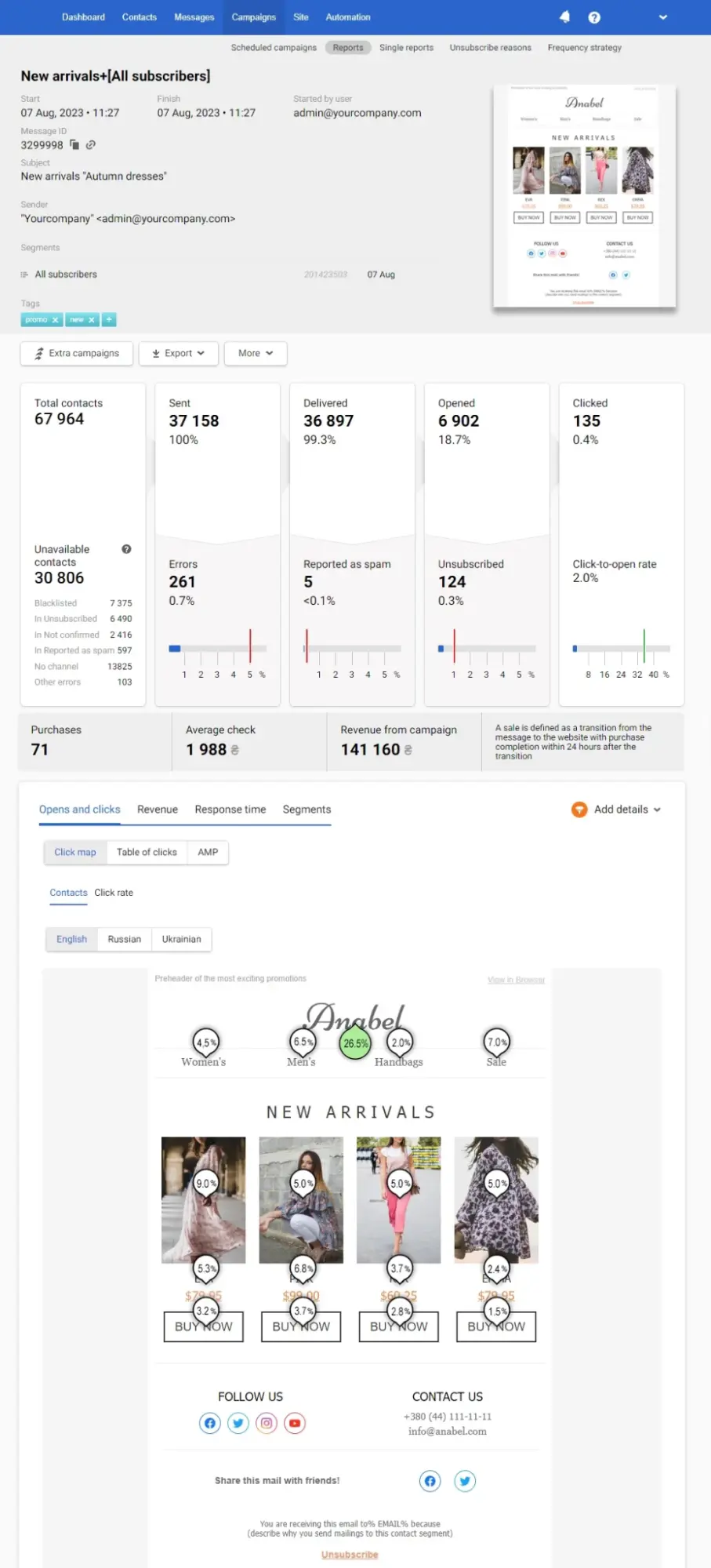
This lets you quickly identify the weak point: a message nobody reads, a channel that isn't delivering, a block that doesn't lead to action. And you don't have to wait for a campaign to finish to make changes – you can do it in the moment. Edits are available directly within an active scenario and take effect without reconfiguring from scratch.
Summary
Omnichannel starts with understanding how customers move between channels, continues with data integration, and takes shape through personalization and automation tools. But the real value emerges when you regularly test and adjust your scenarios, adapting to shifts in behavior.
As a result, the brand stops "speaking" in separate channels and starts communicating with a single voice. The customer experiences consistency and feels seen, while the business sees more stable sales and stronger loyalty.
If your company already has several communication channels, now is the right time to take the next step – connect them into one system and watch separate tools transform into a coherent strategy.
Want to see how this works for your business? Book a demo. Simply fill in the short form below, and we'll walk you through what Yespo CDP can do, using your specific tasks as the starting point.