07 January 2026
18820
11 min
5.00

Google Postmaster Tools: A Full Guide + Last Updates

Kseniia Petrina

Ivan Diulai
You can spend all week on copy and design – Gmail doesn’t care. If your sender reputation tanks, your emails hit spam, and you won’t know until the reports look like a disaster. That’s why reputation monitoring isn’t optional, it’s a must.
This is where Google Postmaster Tools comes into play. It is a free resource provided directly by Google that acts as the only true window into how Gmail views your messages. Not what your ESP reports, not your internal metrics, but what Google sees. It provides essential sender diagnostics that reveal whether you are perceived as a trusted source or a potential spam risk.
For anyone serious about their email marketing, Google Postmaster Tools is an essential instrument that can’t be ignored. You might be dismissing things like warming up domain, but if the reputation of your sending email address is in the gutter, only spam filters will ever see it.
What is Google Postmaster Tools
Google Postmaster Tools is a performance report for your email infrastructure. It is a specialized suite of dashboards that allows senders to get an idea of how Gmail processes their traffic. Unlike third-party tools that rely on estimates or seed lists, Google Postmaster provides reliable data directly from Gmail’s internal systems.
Google Postmaster Tools serves as the source of truth for your domains. Through its interface, you gain access to metrics that affect whether your emails hit the inbox or the spam folder. This includes your domain and IP reputation, authentication status (SPF, DKIM, DMARC), encryption levels, and, most importantly, your spam complaint rate.
For marketers, this transparency is required to maintain list hygiene. Gmail’s algorithms can often feel opaque, but this tool shows why delivery issues occur. If you send large email blasts, Google Postmaster Tools is practically mandatory. Without it, you cannot verify whether your bulk campaigns comply with Google’s strict sender guidelines, leaving your deliverability to chance.
Why Use Google Postmaster Tools
You cannot fix what you cannot measure. Without granular data, your deliverability strategy is effectively guesswork. Consistent reputation monitoring allows you to see your sender score evolve. While there are many sender reputation checkers on the market, only Google Postmaster Tools gives you Google’s internal data, which is far more valuable than a generic public RBL / blocklist listing.
It is also your first line of defense for troubleshooting. When open rates drop, it’s often unclear if the issue is technical or behavioral. Google Postmaster Tools can help you narrow down the category of the problem – for example, whether Gmail is seeing problems with a poor IP reputation or if your emails are triggering spammy content signal. It clarifies whether delivery failures are due to Gmail rejections or temporary failures, and shows high‑level reasons for those errors. You still need your ESP or MTA logs for detailed high bounce rate (hard bounce / soft bounce), counts, and full SMTP error codes.

How to ensure that my emails get delivered?
Finally, it protects your ability to reach the inbox by tracking the most critical metric of all: the user-reported spam rate. Google is notoriously strict here. You must keep your spam rate below 0.1% to maintain healthy delivery. Hitting over 0.3% consistently will almost certainly lead to your messages being blocked. Catching these spikes early allows you to pause campaigns and investigate before permanent damage is done.
100% spam rate is possible – and it’s not always bad
Sometimes, you can see a 100% spam rate on days when you did not send any emails. This happens because of the way Gmail calculates spam rates.
First, consider delayed complaints. Users don’t always mark emails as spam immediately; they might flag a message sent three days ago. Google records this complaint on the day the action is taken, even if no new emails were sent that day.
Second, this triggers a mathematical anomaly. Since the spam rate formula divides complaints by delivered emails, a single delayed complaint on a day with zero volume creates a "division by zero" scenario. Google interprets this technically as the maximum possible complaint rate: 100%.
Don’t panic over isolated spikes on quiet days. Instead, focus on your 30-day trend and metrics during days with actual sending volume.
Google Postmaster Tools: Last Updates in 2025
Sender reputation management changed significantly in 2025. The most immediate change users will notice is the official “sunset” of the classic Google Postmaster Tools interface (v1). Initially, it was supposed to be retired on September 30, 2025. However, the permanent move was postponed and it’s still possible to access v1, although users are encouraged to transition to the modernized v2 interface, which offers a streamlined view of your domain health.
The bigger shift is conceptual: v2 moves from “reputation” to “compliance.” While the old graphs focused on vague reputation scores, the new compliance dashboard provides a binary status check. It’s no longer just about whether your reputation is “High” or “Low”; it is about whether you meet the bulk sender requirements or not. The new dashboard focuses heavily on strict email compliance, flagging specific failures in SPF, DKIM, or DMARC.
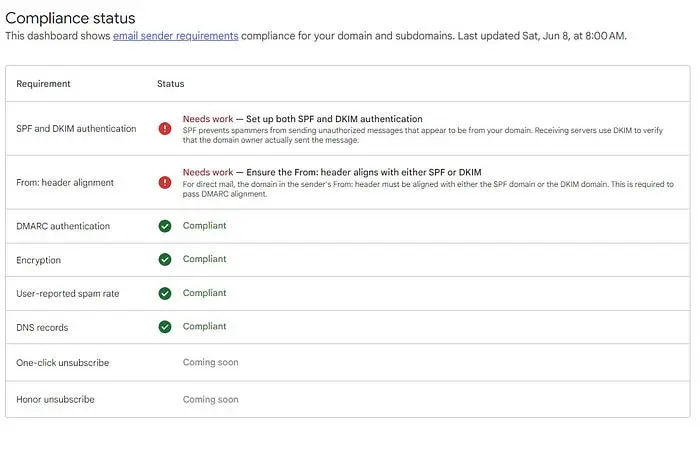
Starting November 2025, enforcement has tightened. Previously, a bad reputation meant your emails landed in the spam folder. Now, messages that fail key sender requirements may experience disruptions, including temporary rate limits and permanent rejections.
Developer note (when do engineers need to act?)
If you only review Postmaster reports in the web interface: developers don’t need to do anything – Google is moving users to the new Postmaster Tools (v2) experience.
If you have internal dashboards or monitoring scripts pulling data: developers should plan the API migration. Google plans the Postmaster Tools API v2 and states the current v1 API will be retired once v2 launches; v2 includes significant schema changes, so existing scripts will require updates.
How to Set Up Google Postmaster Tools: A Step-by-Step Guide
If you are wondering how to use Google Postmaster Tools – it is straightforward, but requires access to your domain’s DNS settings. The process is broken down into four distinct phases.
Step 1: Domain Addition. Go to the Google Postmaster Tools website and sign in with a Gmail or Google Workspace account. Enter the authentication domain you use to send emails (e.g., marketing.yourbrand.com). It is often better to track the specific subdomain used for marketing rather than just the root domain, as this provides cleaner data.
Step 2: Verification. Google requires proof of ownership via domain verification.
- After adding the domain, Google will generate a unique verification token.
- Copy this string of text.
- Log in to your domain hosting provider (like GoDaddy, Cloudflare, or Namecheap) and open the DNS Management or DNS Zone Editor.
- Create a new record: select TXT as the type, enter @ (or your subdomain) as the host, and paste the Google token into the value field. This DNS TXT record acts as a digital handshake. Once saved, return to Google Postmaster Tools and click “Verify.” Note that DNS changes can take anywhere from minutes to 24 hours to propagate.
I want to improve my email marketing
Step 3: Access Control. Once verified, you can begin tracking your domain reputation. However, email marketing is rarely a one-person job. In the domain management section (found under the three-dot menu), you can grant access to other team members. This allows your deliverability specialist or agency to view the data without needing your personal login credentials.
Step 4: Authentication Checks. Verification proves ownership, but does not fix your sending infrastructure. The tool will immediately begin checking your traffic for SPF authentication, DKIM authentication, and DMARC authentication. If these protocols are missing or misconfigured, the dashboards will show a 0% success rate, and your emails will likely be rejected under the new 2025 enforcement rules. Ensure these records are active in your DNS settings alongside your verification token; a quick DNS lookup confirms your SPF, DKIM, and DMARC records are published and publicly readable before you rely on them.
Learn more about email deliverability in our free guide: "The Path to Perfect Email Sender Reputation."
How Yespo Supports Your Email Deliverability
Google Postmaster Tools give you the data. Acting on it is another problem – especially if your team doesn’t live in DNS settings and authentication protocols. Yespo simplifies the technical setup, acting as a bridge between your marketing strategy and Google’s strict infrastructure requirements. Beyond just email, ensuring your entire site is optimized, such as when you WordPress offload media to improve overall domain performance, creates a more reliable environment for your digital communications.
As a Customer Data Platform (CDP), Yespo handles authentication automatically. When you send through our system, we ensure that protocols like SPF and DKIM are correctly aligned. Furthermore, we enforce strict encryption standards, managing both TLS inbound and TLS outbound security. This ensures that your data is encrypted in transit – a signal Google looks for when determining if a sender is trustworthy.
Beyond technical configuration, maintaining a high reputation requires disciplined audience management. Yespo provides automated tools for list hygiene, allowing you to easily segment and remove invalid addresses. Our system supports opt-in and confirmed opt-in flows to prevent spam traps from entering your database in the first place.
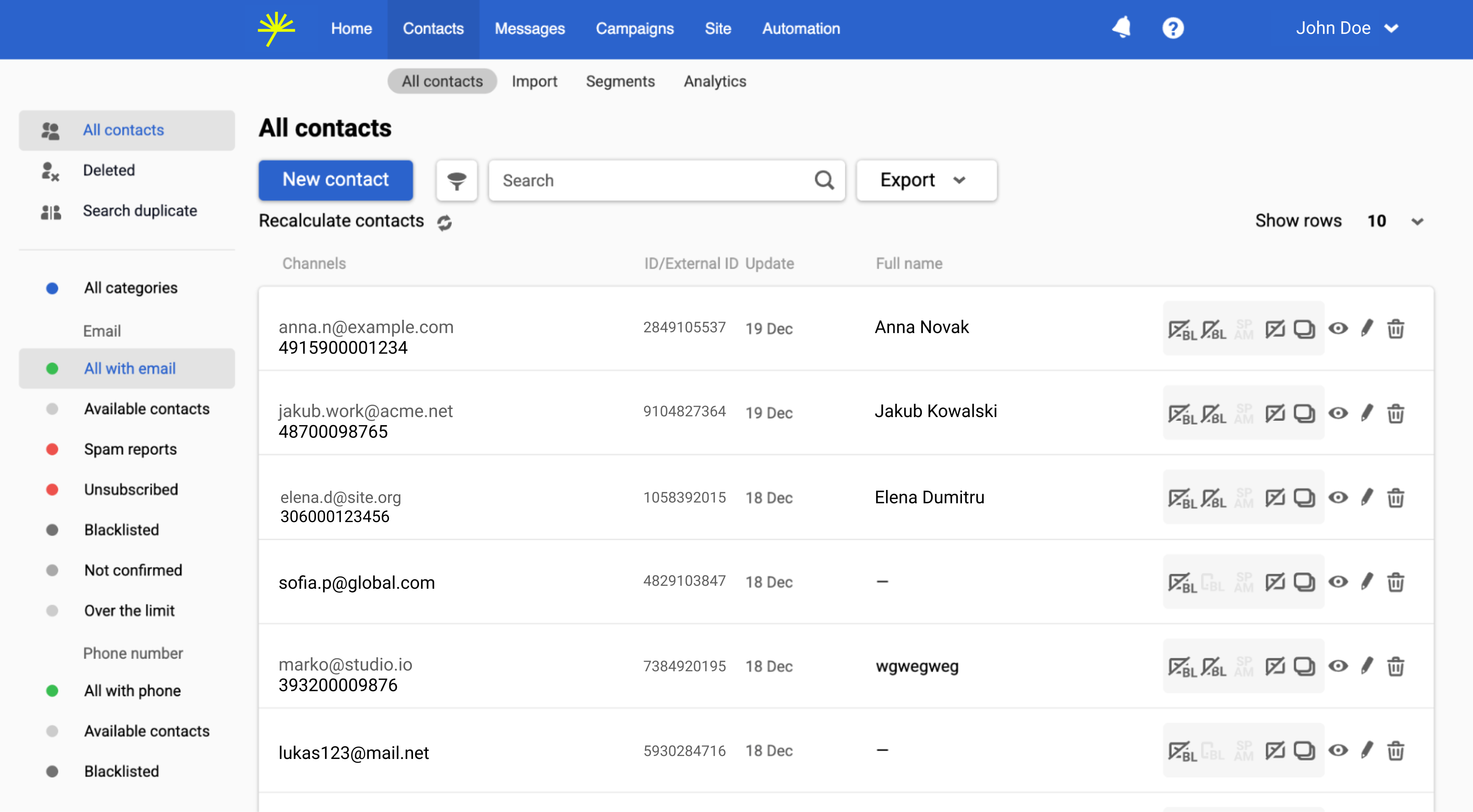
We help you maintain healthy engagement rates of your email campaigns through inactive recipients pruning. You can set automated rules to stop sending to users who haven’t opened an email in 3, 6, or 12 months. This prevents your engagement metrics from tanking, which is a contributing factor to poor reputation.
Google Postmaster Tools isn’t optional anymore. Under 2025 rules, the question isn’t whether your reputation is good or bad – it’s whether you’re compliant or blocked.
Do not treat this dashboard as a one-time setup. Deliverability is dynamic. Your engagement signals – like opens, clicks, and deletion rates – fluctuate with every campaign you send. We recommend checking your compliance status weekly to catch minor issues before they become blocking events.
Verify that your spoofing protection (SPF, DKIM, DMARC) is fully active and that your mailing lists are pruned of inactive contacts. By combining technical security with proactive hygiene, you ensure your emails land in your customers’ inboxes.
Need help getting this set up properly? Fill out the form below – we’ll walk you through it.