Content
31 January 2026
3992
15 min
5.00

A Full Guide to OpenCart: Pricing, Features & Setup Tutorial

Alina Yarova
Content
The online sales market is moving incredibly fast, and businesses that fail to adapt risk falling behind. Therefore, ecommerce business ideas that allow you to quickly launch a store, control costs, and easily scale up are becoming strategically important. The free OpenCart platform is something of a magic wand that allows you to deploy and manage online stores quickly.
In this article, we will explore OpenCart as a practical, cost-effective, and open-source ecommerce solution for any business, examining its key features, as well as the costs of launching and maintaining a store. In addition, we will provide a step-by-step guide to creating an online store so that readers can quickly assess the platform's potential for their business.
What is OpenCart?
OpenCart is an open-source platform for quickly creating and managing online stores. It is aimed at small and medium-sized businesses that want to quickly enter the market without complex development and design processes. The platform is built on PHP and uses MySQL.
OpenCart can be described as a pragmatic middle ground between high-end enterprise platforms with expensive design and complex management, and overly simple, non-competitive online stores. You won’t get deep, enterprise-level functionality here, but you gain in simplicity, control, and overall cost efficiency.
OpenCart Key Features and Benefits
Today, OpenCart is widely perceived as one of the most economically efficient ecommerce solutions, as it offers:
Low total cost of ownership (TCO)
No licensing fees, affordable extensions, and moderate hosting requirements make OpenCart a financially predictable platform.
Full access to the source code
Its open-source nature ensures technical independence, flexible customization, and freedom from vendor lock-in. All these are crucial for growing and scaling businesses.
Fast time-to-market
Thanks to a clear and intuitive admin panel, store owners are given near full autonomy to launch and manage their online presence quickly.
Basic SEO
The platform provides essential SEO features. It allows businesses to enter the online ecosystem quickly and grow organically. This flexibility also makes OpenCart a practical option for stores selling dropshipping products, especially for entrepreneurs looking for low upfront inventory costs.
Mobile/Tablet adaptive
Today, it is extremely important to have a website that is adapted to any device. With OpenCart, this is not a problem, as the platform offers responsive design and functionality right out of the box.
Multi-currency and multi-language support
An OpenCart-based store is ready for international trading and localization, eliminating the need for architectural overhauls.
Integrations with payment and logistics services
With a wide range of extensions for payments, shipping, marketing, and analytics, you can quickly and seamlessly integrate almost any essential service.
Marketing and Promotion Tools
OpenCart has built-in marketing and promotion tools that enable companies to attract and retain customers. Coupons, promotions, and special discounts are all included in the basic functionality.
Connect CDP to your OpenCart store
OpenCart Pricing Plans Overview
1. Core Platform
Since the OpenCart platform positions itself as an open, free resource, you can install it on your server at no cost. However, you will need to pay for infrastructure and additional services.
2. Hosting Costs
Although the platform is free, hosting must be paid for every month.
Important
Since OpenCart is not a cloud service, its files, database, and media must be stored and processed somewhere. Hosting is that "somewhere." The quality of hosting directly affects the speed, security, and scalability of the website.
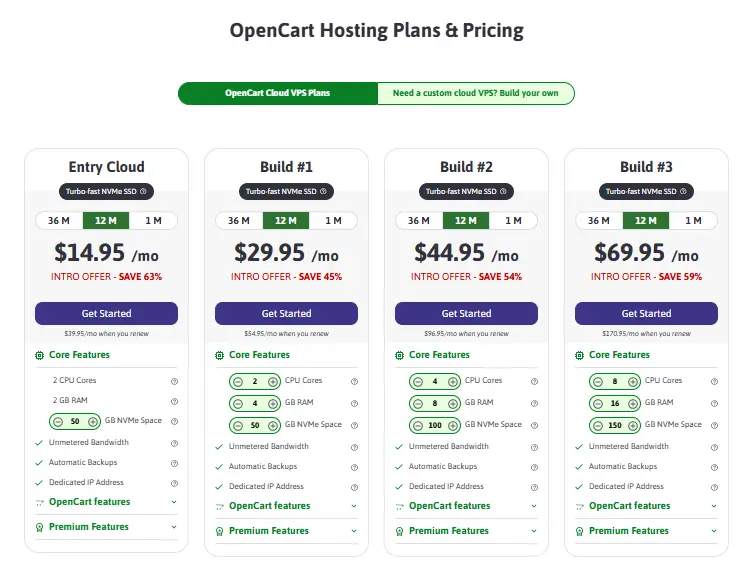
Basic OpenCart cloud hosting starts at $14.95/month when paid for a year. Note, this is not cheap shared hosting, like the $5/month plans you see in blogs, but a serious VPS, optimized for OpenCart.
- Better packages for stores looking to scale cost $30/month and up.
- Custom cloud hosting will cost the same or more, depending on your needs and the options offered.
If you wish to have full control over your hosting environment, you can self-host your store. It can cost around $300–$600 yearly for a basic setup. With larger, more complex stores, this cost can rise dramatically.
For basic settings, you can consider web hosting, which starts at around $5.
3. Themes and extensions
You can choose basic software for free, but for a professional, modern look and additional functionality, it is worth purchasing additional components.
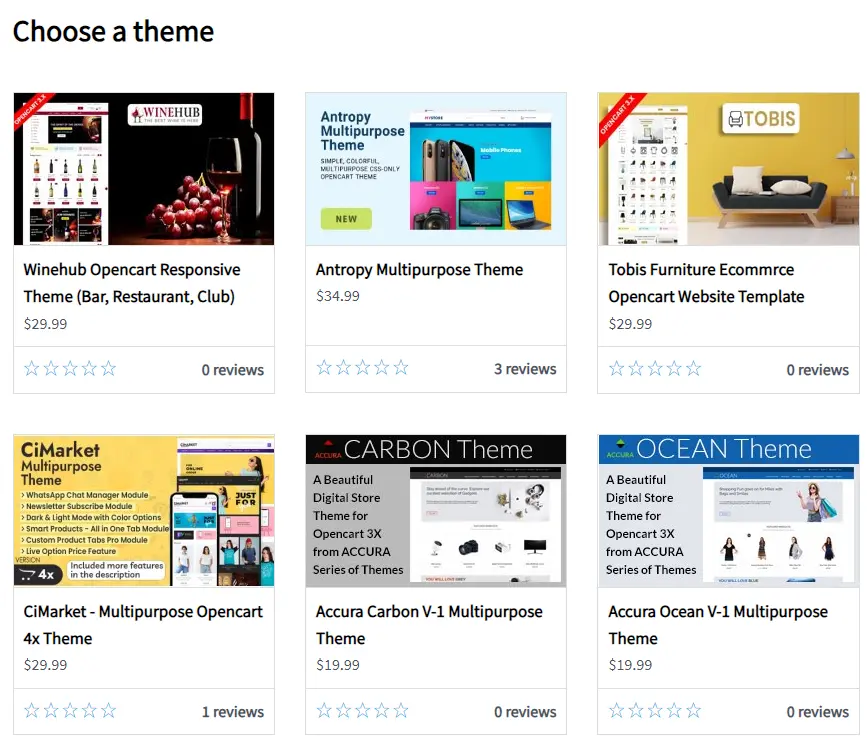
- Premium theme templates usually cost between $20 and $100 or more for a one-time purchase.
- Basic extensions, such as SEO URL, XML Sitemap, and Payment Module (Stripe/PayPal), can often be connected for free. However, for more advanced features, a one-time fee of $20–$60 is required.
- More complex integrations with rates of $50–$200+ for connecting more stable payment modules, complex logistics, marketing tools, SEO packages, etc.
The total cost of expansion can reach $400–$1,300/year or more if you connect several important features. But, on the other hand, $150–250 is enough to get started so that the store looks and works like a business, not a demo.
4. Development & Customization
If you need custom development or turnkey design, the actual prices go far beyond "free":
- The development of a basic turnkey store at an agency can start at approximately $3,500+ for Eastern Europe and $8,000+ for Western Europe, depending on the scope and complexity.
- Advanced solutions with integrations, SEO, multilingualism, or multi-storefronts can cost $7-10K and $10-15K, respectively.
5. Ongoing Operational Costs
Apart from hosting and themes, it is worth considering:
- Security services (SSL, WAF) — $0–$150+/year.
- Technical support and maintenance — $50–$300+/month, depending on the SLA.
- Marketing/SEO tools — variable costs depending on strategy.
How to Build an Online Store with OpenCart: A Step-by-Step Tutorial
Step 0: Planning
Before you start with technical settings and "playing around" with design and paid extensions, you should think about the foundation for your store. That is, decide for yourself:
- will it be B2C or B2B;
- target region, currency, and languages;
- exact type of products
- a realistic budget — both for launch and ongoing monthly/annual costs;
- the minimum set of features required for the store to actually generate sales.
And most importantly, choose your hosting for OpenCart carefully.
Consider choosing a paid plan that already includes a domain, as it's very useful.
Step 1: Downloading and installing OpenCart
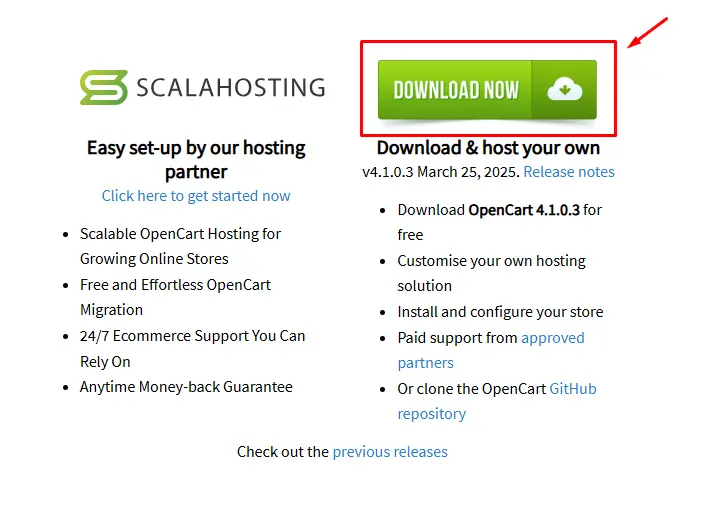
1. Download the latest version of OpenCart from opencart.com.
 2. Extract the files, for example, using a program like WinRAR.
3. Upload the extracted files to your server via FTP/SFTP or through your hosting control panel.
- Note, when opening the zip file, the following files will be visible: "upload" folder, "license.txt" file, "readme.txt" file. The "upload" folder contains all the files needed to upload OpenCart to a web server.
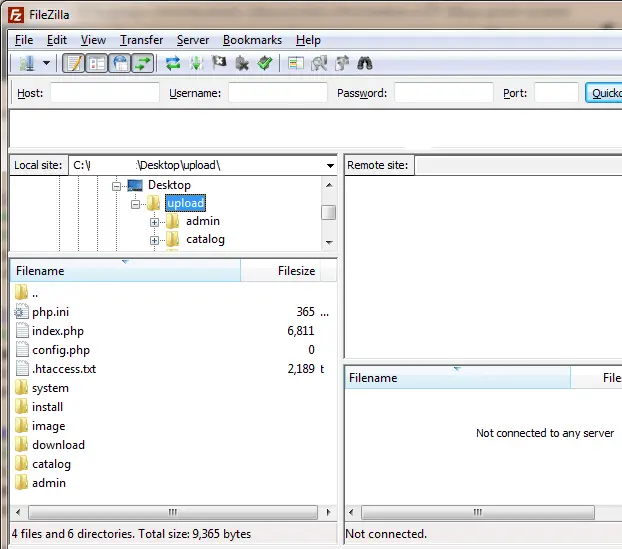
- Use FileZilla as a free FTP client to upload uncompressed files to your server.
4. Open the Site Manager in FileZilla and connect to your server.
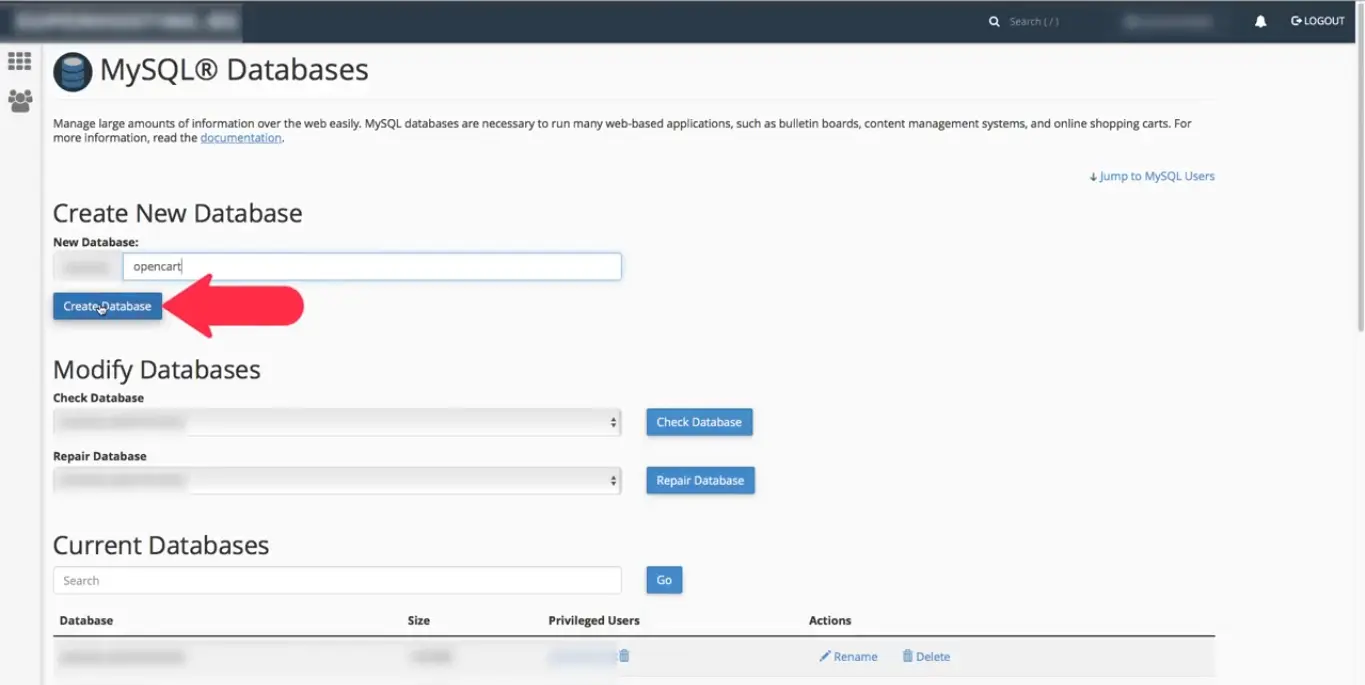
5. Create a MySQL database using the hosting panel, such as cPanel/DirectAdmin.
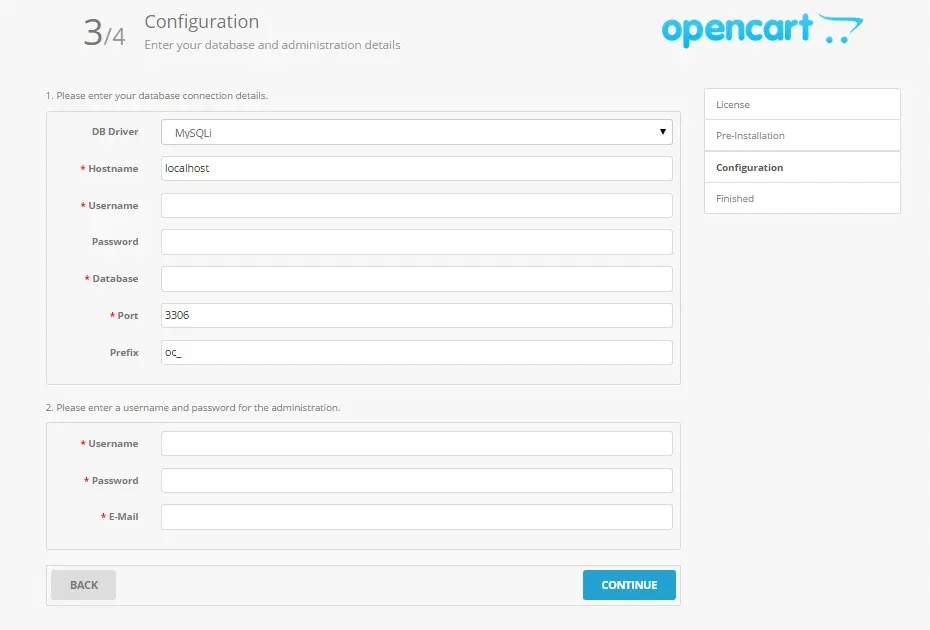
6. Launch the auto-installer.
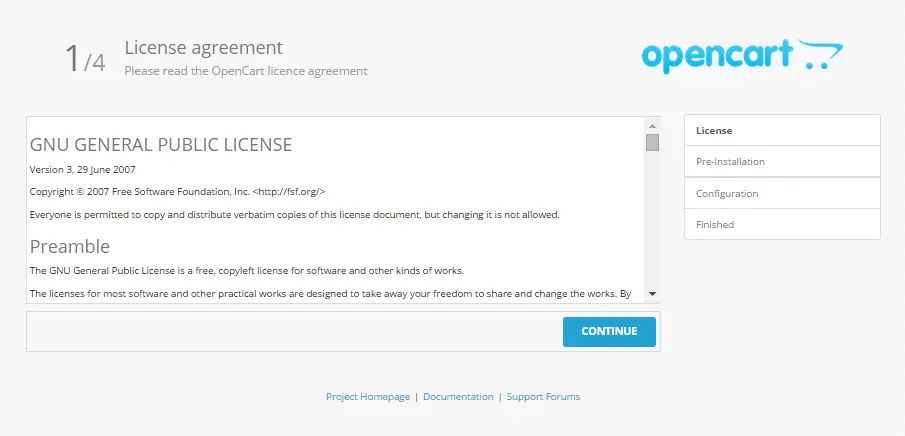
During installation, specify:
- database
- administrator login/password
- Store URL, etc.
Important
After the installation is complete, the "install" folder is no longer required. You should delete it in the Remote Site section of FileZilla for security reasons.
Step 2: Configuring Basic Settings
After deploying your store on the server, you need to take care of the basic setup, including:
- Defining the store name, description, and contact details.
- Setting up localization, such as currency, interface language, and on-site content.
- Configuring SEO and the technical foundation.
- Installing payment systems and basic shipping methods.
- Completing product pages with descriptions, pricing, and images.
- Adding coupons or basic promotional campaigns.
- Connecting analytics tools.
- Preparing the store for CDP integration (for example, Yespo).
Additional OpenCart Functionality and Customization Features
In addition to basic advantages such as ease of deployment and store configuration, OpenCart offers users additional options (perhaps even compared to competitors).
Multi-level user and access rights management
Obviously, several people can manage a store, so the platform provides the ability to create groups of administrators with different access levels. In addition, it is possible to define different user roles and automatically grant them certain access rights to the admin panel.
Security and backup
OpenCart extensions can be used to enable two-factor authentication for administrative accounts, reducing the risk of unauthorized access. Storing admin logins in a business password manager adds a further layer of protection, keeping credentials strong, unique, and securely shared across the team. The platform also supports automatic backup of databases and media files, allowing you to quickly restore your store in case of failure. Protection against spam, bots, and DDoS attacks can also be configured through specialized modules.
Page builder
Surely, no one is surprised by drag-and-drop page builders anymore. But adaptive blocks for mobile devices and tablets, as well as the ability to hide and show website elements for different user groups, are very convenient features for online store owners.
Automation and integration
OpenCart easily connects to Amazon, eBay, and Etsy, allowing you to quickly and easily synchronize all products and orders with the new service. In addition, there is an option to automatically update inventory levels, which helps avoid errors and overload the operations team. Furthermore, you can also use workflow automation tools like Zapier, Make, or some popular Make alternatives to streamline repetitive tasks, connect external services, and build more efficient operational workflows without heavy development.
How to Boost Sales on OpenCart with Yespo
Yespo CDP integrates with OpenCart just as effectively as it does with WooCommerce or Shopify. The primary features that Yespo customers get in this case are invaluable:
1. Centralized customer data management
To understand how to sell, you first need to understand who you are selling to. With a CDP, you get automated data collection on purchases, on-site customer behavioral data, product views, and interactions across direct marketing channels. This makes it possible to build unified customer profiles and include them in different communication workflows based on specific parameters — for example, segmenting audiences by interests, purchase frequency, or average order value.
2. Personalized marketing campaigns
By leveraging automatically updated customer metrics, you can easily personalize communication through automated email and push campaigns, as well as on-site product recommendations and across all nine communication channels provided by the CDP.
3. Automation of trigger campaigns
The CDP offers an effective system of trigger-based campaigns, including sending messages for cart abandonment, bringing returning clients back to the website, or reaching loyalty thresholds.
4. Deep real-time analytics
In addition to the essential ability to integrate with Google Analytics, Facebook Ads, and CRM systems, Yespo CDP goes beyond basic statistics, turning them into actionable insights for your business. Key features include:
- Tracking the performance of marketing campaigns across multiple channels for better personalization.
- Automatically optimizing campaigns based on real-time data to maximize ROI.
Want to see how segmentation and triggers work for OpenCart?
Possible Challenges and Cons of OpenCart
Although OpenCart is a cost-effective and fairly flexible platform, there are important limitations to consider if you are thinking about starting a business with OpenCart.
Need additional investments
You need to understand that the free functionality alone won’t make your store competitive. It can handle something simple, but it won’t create a multi-level, fully-featured online store. Many additional features, such as marketing, SEO, logistics, or payment gateway integrations, require paid modules.
Limited functionality
For large, complex solutions with multi-level CRM, advanced order management, and inventory control, you’ll need to work with modules and connect the necessary extensions. For truly sophisticated setups, custom development may be required. Still, this approach gives you a clear and manageable foundation.
Need for technical skills
The store owner must have at least some technical skills or enlist the support of technical specialists. Although OpenCart is intuitive, installing, configuring, and updating the platform often requires basic knowledge of PHP, MySQL, and FTP.
Updates and Compatibility
When new versions of OpenCart are released, not all modules and themes are immediately compatible. As a result, adjustments and testing may be required, and if you have a custom solution, this can involve bringing in additional specialists.
Final thoughts
In 2026, OpenCart remains one of the best ecommerce platforms for small business, offering a cost-effective and flexible solution for e-commerce beginners as well as small and medium-sized enterprises. The platform allows you to quickly launch online stores, obtain stable basic analytics, and scale without expensive enterprise solutions.
Thanks to its simple functionality, OpenCart serves as a starting platform for simple stores, but, as practice has shown, if you need a comprehensive solution with further scaling, it is worth considering various modules, integrations with third-party services, or even custom website development.
Integration with Yespo CDP allows you to use OpenCart as effectively as possible, turning it into a full-fledged marketing platform: automated push notifications, email, and SMS campaigns, personalized offers, analytics, and audience segmentation help increase conversions, retain customers, and stimulate repeat sales, making the platform truly business-oriented.